Define meaningful feature use
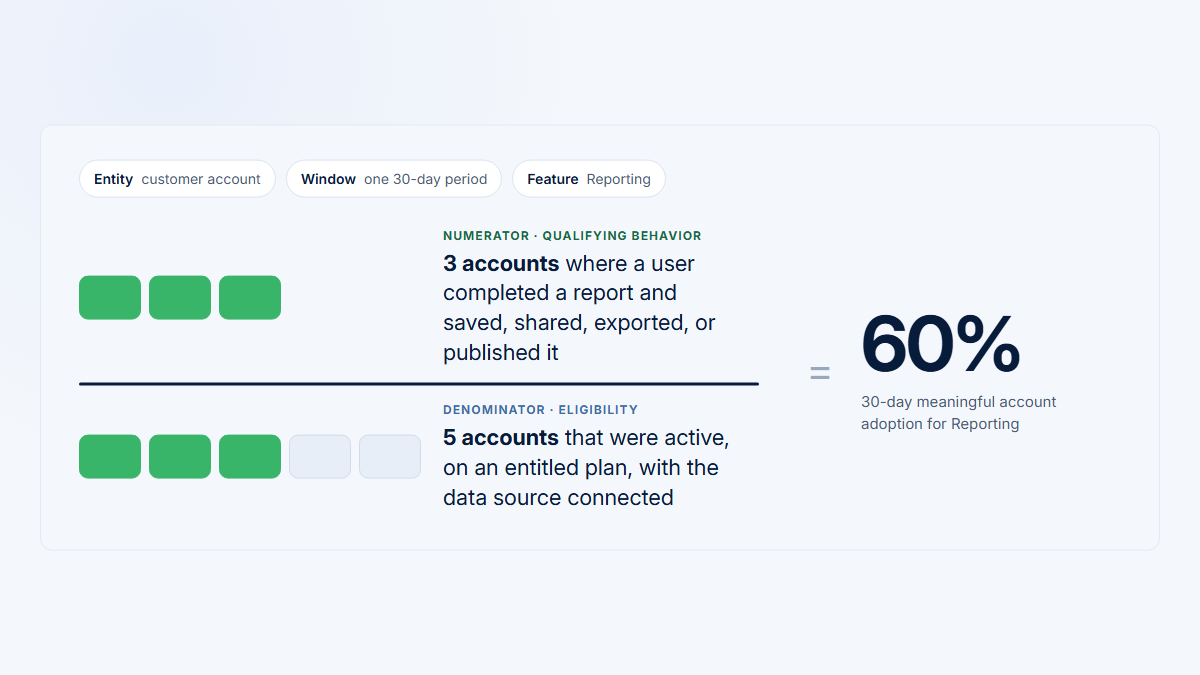
A useful definition is specific enough to implement and modest enough to interpret. “Used Reporting” is ambiguous; “an eligible user saved a valid non-template report in an eligible account during the quarter” names the entity, threshold, exclusions, and period.
Meaningful does not mean proven customer value. Product telemetry can show that a workflow completed; it usually cannot prove that a report was understood, changed a decision, or caused renewal. Treat the metric as behavioral evidence and combine it with qualitative, commercial, or outcome evidence where the decision requires it.
What turns a phrase into a definition
The usual claim
“42% of accounts used Reporting”
Three questions unanswered, so nobody can reproduce the number.
A definition someone else could recompute
An eligible user in an eligible account
Saved a valid, non‑template report
At least once this quarter
answers which users?
answers opened, or finished?
answers over what period?
| Part | Question | Reporting example |
|---|---|---|
| Job | What is the user or account trying to accomplish? | Create a durable report for review or distribution |
| Eligibility | Who could reasonably do it? | Accounts with Reporting enabled and users with create permission |
| Qualifying behavior | What observable evidence represents progress? | Backend confirms a valid non-template report was saved |
| Period | When must it happen? | At least once this quarter, or in two monthly cycles for recurrence |
Use a signal ladder from exposure to outcome
- Availability: the feature is enabled and relevant; this belongs in eligibility, not the numerator.
- Exposure: an entry point could be seen.
- Discovery: the page or workflow opened.
- Interaction: the user clicked, filtered, typed, or changed a control.
- Progress: a meaningful intermediate step completed.
- Workflow completion: the product confirmed a success state.
- Repeated use: completion occurred again at an appropriate cadence.
- Product or customer outcome: the feature contributed to the intended result, sometimes outside the product.
Signals nearer the outcome usually provide stronger evidence, but not every feature needs every stage. A one-click export may complete immediately. An integration may require authentication, mapping, validation, and a first successful delivery. A dashboard can provide value through reading, while a collaborative workflow may need another person to review or act.
Eight signals, from availability to outcome
Evidence strengthens left to right. The threshold you publish is a choice about how much of it you need.
1Availability
Enabled and relevant
2Exposure
Entry point could be seen
3Discovery
The workflow opened
4Interaction
Clicked, filtered, typed
5Progress
An intermediate step completed
6Completion
The product confirmed success
7Repeat
Completed again at cadence
8Outcome
The intended result arrived
weaker evidencestronger evidence
Not every feature needs every stage. A one-click export completes at 6 immediately. An integration passes through 4, 5 and 6 before it is usable. A dashboard may deliver its value at 3.
Stage 8 is rarely observable. The result often lands in a spreadsheet, a meeting, or a customer’s own system. Correlation with retention is not proof of cause.
| Candidate | Can support | May hide |
|---|---|---|
| Page viewed | Reach or discovery | Automatic, accidental, or abandoned visits |
| Control clicked | Intent or interaction | Failure, retries, reversal, or confusion |
| Configuration started | Progress beyond discovery | Invalid or abandoned attempts |
| Setup completed | Administrator milestone | Configuration that never becomes usable |
| Object saved | Durable output | Empty, test, duplicate, or unused objects |
| Output shared/exported | Movement into a broader workflow | Whether anyone used the result |
| Repeated use | Return behavior at a defined cadence | Troubleshooting bursts or an arbitrary window |
Choose an event, state, sequence, or recurrence rule
Single event
report_exportedUse when one confirmed action represents completion. Fire after success, not merely on button press.
Product state
integration_status = "connected"Use for persistent conditions reached through several paths. Add a first successful delivery if “connected” can exist without working.
Sequence
setup_started → provider_authenticated → data_selected → import_completedUse when several ordered steps define progress and the final success state is explicit.
Recurrence
workflow_completed in at least 2 distinct weekly periodsUse when the job must recur. Match the period to natural cadence rather than a convenient dashboard window.
Definitions can combine methods. An automated integration might require an eligible account, connected state, one successful delivery, and an exclusion for test workspaces. A collaborative report might require a saved output plus later review by another eligible user. Complexity is justified only when it prevents a material false positive or false negative.
Write the definition as a sentence that a product manager, engineer, analyst, and customer-facing teammate interpret the same way. Include the entity, eligibility snapshot, qualifying behavior, time window, recurrence or aggregation rule, and exclusions. If the sentence cannot distinguish a real completion from a retry, template, internal test, or automated action, tighten it before implementation.
| Feature type | Better starting signal | Add when needed | Typical false positive |
|---|---|---|---|
| Simple action | Authoritative success event | Object validity or destination | Click fired before failure |
| Multi-step workflow | Completed sequence | Progress and abandonment states | Started but never finished |
| One-time setup | Valid configured state | First successful downstream outcome | Connected but unusable |
| Passive dashboard | Qualified visible consumption proxy | Subsequent navigation or acknowledgement | Background tab or automatic load |
| Collaborative feature | Output shared plus another eligible user’s response | Account penetration | Invite or share never consumed |
| Automated capability | Valid configuration plus recurring system outcomes | Reliability and human review | Background retries counted as engagement |
Use the simplest row that represents the job. A more elaborate rule is not inherently more accurate: every additional step creates another instrumentation and eligibility dependency. Record why each condition exists and test whether removing it would change the decision materially.
Worked example: five Reporting thresholds
Illustrative data, not a benchmark. Five fictional accounts contain twenty eligible users over eight weeks. The team tests progressively stronger definitions: viewed, started, saved, exported/shared, and exported/shared in at least two weekly periods.
| Account | Eligible users | Viewed | Started | Saved | Exported/shared | Repeated 2+ weeks |
|---|---|---|---|---|---|---|
| Atlas Labs | 6 | 5 | 4 | 3 | 3 | 2 |
| Northstar Works | 5 | 2 | 1 | 1 | 1 | 1 |
| Beacon Systems | 4 | 3 | 2 | 0 | 0 | 0 |
| Meridian Group | 3 | 0 | 0 | 0 | 0 | 0 |
| Harbor Analytics | 2 | 2 | 2 | 2 | 1 | 1 |
| Total | 20 | 12 | 9 | 6 | 5 | 4 |
Meridian receives eight automatically scheduled reports but has no human Reporting activity. Its automated value is real and should be reported separately, not counted as ordinary user adoption or silently discarded.
| Threshold | Accounts | Account adoption | Users | User adoption | Penetration in adopting accounts |
|---|---|---|---|---|---|
| Viewed | 4/5 | 80% | 12/20 | 60% | 12/17 = 71% |
| Started | 4/5 | 80% | 9/20 | 45% | 9/17 = 53% |
| Saved | 3/5 | 60% | 6/20 | 30% | 6/13 = 46% |
| Exported/shared | 3/5 | 60% | 5/20 | 25% | 5/13 = 38% |
| Repeated | 3/5 | 60% | 4/20 | 20% | 4/13 = 31% |
Five thresholds, the same twenty users
Illustrative only. Five fictional accounts, twenty eligible users, eight weeks. Each row applies a stricter definition to the same population — the dots go out from the bottom up.
Atlas Labs
6 eligible
Northstar Works
5 eligible
Beacon Systems
4 eligible
Meridian Group
3 eligible
Harbor
2 eligible
users
accounts
Viewed
opened the page
12/20
4/5
Started
began building one
9/20
4/5
Saved
a valid report exists
6/20
3/5
Exported or shared
it left the product
5/20
3/5
Repeated
in 2+ weekly periods
4/20
3/5
Beacon Systems passes on viewing and starting, then disappears. Its setup never produced a report — the view threshold called that adoption.
Northstar Works survives every threshold on one person. Account adoption stays green while penetration is 1 of 5.
Meridian Group has no human use and eight automated scheduled reports. That value is real; report it as automated, not as adoption — and not as zero.
Account adoption falls from 80% to 60% across these five rows; user adoption falls from 60% to 20%. Publish the threshold next to the number, or the number means nothing.
The view threshold answers discovery but misclassifies Beacon as adopted. Saving filters out failed setup. Exporting or sharing provides stronger evidence of downstream use but misses in-product review. Recurrence shows return behavior and exposes Northstar’s single-champion concentration. No one threshold answers every decision.
Handle passive, automated, and recurring use separately
Passive consumption cannot be measured as attention. A visible dashboard with sufficient foreground time, meaningful navigation, or an acknowledgement can support an “observed consumption” rule, but tab visibility is not comprehension. State the proxy plainly.
Separate four categories:
- Human adoption: an eligible person performs the qualifying behavior.
- Configuration: an administrator enables a durable capability.
- Automated value: a schedule or integration produces valid outcomes without human interaction.
- System activity: retries, maintenance, tests, or background work that should not imply adoption.
| Job | Possible rule | Reasoning |
|---|---|---|
| Domain verification | Verified state once | Repetition may mean failure |
| Integration setup | Connected plus first successful delivery | Ongoing delivery is a separate reliability metric |
| Monthly reporting | Completion in two monthly periods | Matches month-end work |
| Daily operations | Completion on a required number of active days | Regular repetition is part of the job |
| Quarterly planning | Completion in eligible quarters | A 30-day window would misclassify healthy use |
Repeated-use rate
adopters who complete the qualifying behavior in the required number of distinct periods ÷ initial adopters × 100
Document the required periods, calendar unit, observation window, initial-adopter definition, and maturity rule for recent adopters. Distinct periods are often safer than raw counts: ten exports in one troubleshooting Visit are not ten periods of adoption.
Validate the definition before publishing the metric
- State the product or customer job.
- List eligible accounts, users, roles, prerequisites, and exclusions.
- Map valid and invalid paths to the outcome.
- Choose the weakest signal that is still credible for the decision.
- Confirm the event fires after success and deduplicates retries.
- Separate human, automated, and system actors.
- Set the account/user unit, cadence, and observation window.
- Inspect raw events, product records, and representative Visits.
- Compare false positives and false negatives with PM, engineering, data, and customer-facing teams.
- Version the definition and annotate material changes.
Common definition mistakes
- Counting availability or a page view as adoption.
- Using a click when the server owns success.
- Applying one threshold to simple, complex, passive, and automated features.
- Ignoring eligibility, account context, cadence, or recent-adopter maturity.
- Letting test objects, retries, templates, or system jobs qualify.
- Equating account adoption with broad user adoption.
- Claiming behavioral correlation proves customer value or renewal.
Definition review record
For each published metric, keep a short record containing the product job, entity, eligibility snapshot rule, exact event or state, excluded actors and objects, account aggregation rule, cadence, observation window, recent-adopter treatment, and known blind spots. Link the implementation owner, product owner, validation evidence, and effective version.
Review a small sample of qualifying and non-qualifying accounts. For qualifiers, verify that the product record and Visit support the claimed behavior and that one user, automation, or retry pattern is not distorting interpretation.
For non-qualifiers, check whether an alternative valid path, passive use, automated outcome, missing identity, or unavailable prerequisite creates a false negative. Publish the metric only when the team can explain both types of error and accept them for the named decision.
Connect the signal to account and Visit evidence
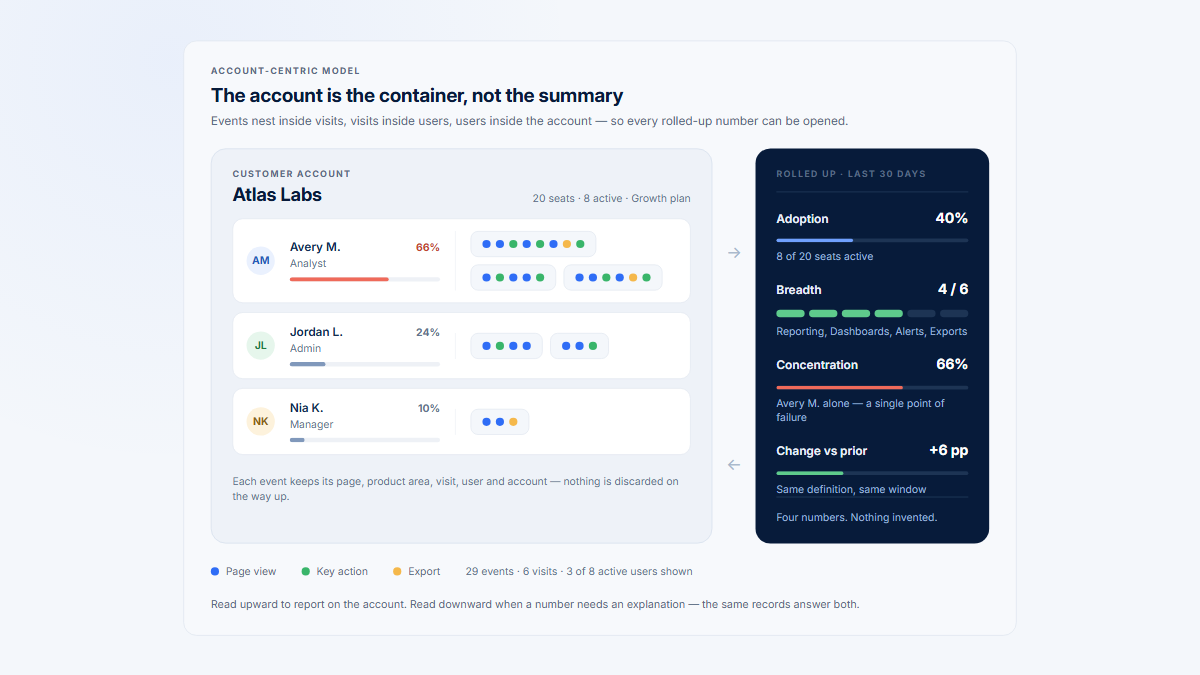
Hymetry organizes feature signals around grouped Pages and product areas, then connects them to Companies, Users, and Visits. This lets a team distinguish account adoption from user penetration, identify concentration in one champion, and inspect the sessions behind a qualifying or missing behavior.
The product does not decide which behavior is meaningful. The team still owns eligibility, semantic events, success conditions, recurrence, privacy, and the causal limits of the metric.
Frequently asked questions
Is a page view meaningful feature use?
Usually it is evidence of reach or discovery, not completion. It may be sufficient only when reaching and consuming that surface is genuinely the job and the proxy is stated without claiming attention.
What event should count as feature adoption?
The event that most credibly represents the feature’s intended job for an eligible entity. Prefer an authoritative success event; use state, a sequence, or recurrence when a single event cannot represent the workflow.
Can a click count as meaningful use?
Yes when the click itself completes a simple action and success is effectively immediate. If processing can fail or complete asynchronously, distinguish intent from the server-confirmed outcome.
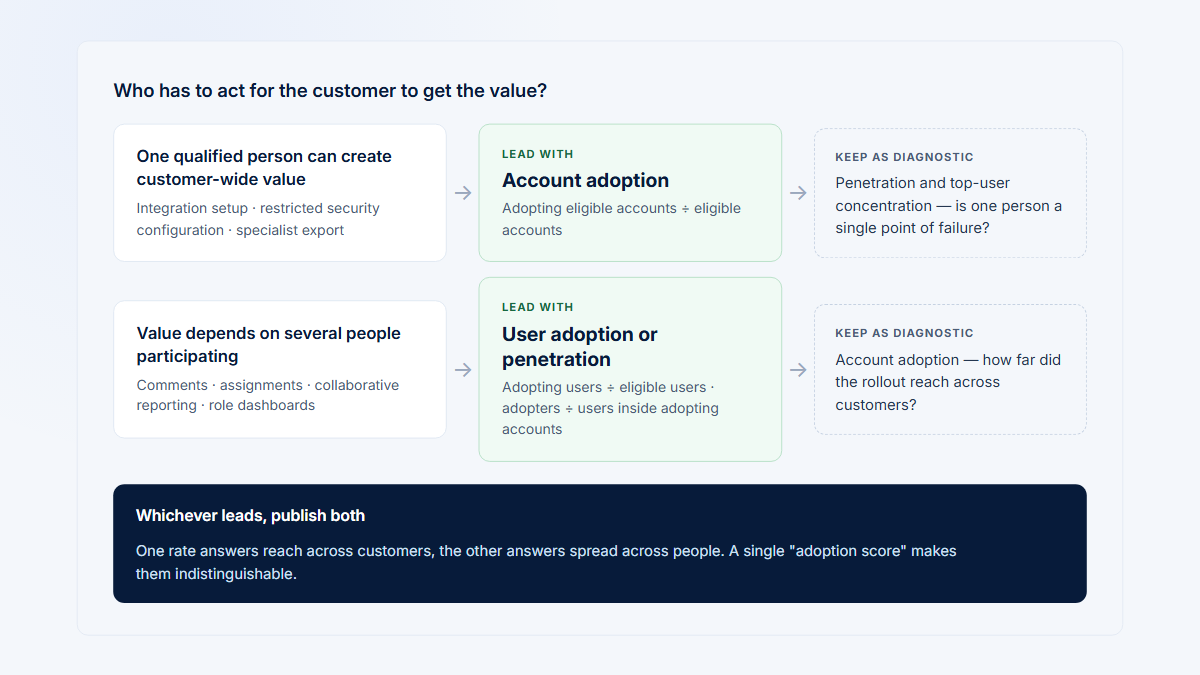
Should adoption be measured by account or user?
Usually both. Account adoption shows whether the customer has any qualifying use; user adoption and penetration show breadth and whether usage depends on one champion.
How should scheduled reports and integrations be counted?
Track configuration, automated outcomes, reliability, and human interaction separately. Automated value can be real without implying current human engagement.
How many times must a feature be used before it is adopted?
There is no universal count. One-time setup may need one valid completion; a recurring job needs use across distinct periods aligned to its natural cadence.
Does meaningful use prove customer value or renewal?
No. It is behavioral evidence. Outcomes may occur outside the product, and correlation with retention does not prove causation.
Sources
Method note: The framework synthesizes product-measurement, task-analysis, usability, and statistical guidance. Product-specific examples are illustrative.
Methodology and limits
No external source establishes one universal meaningful-use threshold. Vendor documentation supports how page views, funnels, retention, and tracking plans operate; UX and statistics references support the distinction between observed behavior, task success, attitude, correlation, and causation. The final definition remains a product decision validated against implementation and user evidence.
Full source directory
- Google Research HEART framework
- Google Analytics enhanced measurement and user engagement
- WHATWG page visibility
- Snowplow tracking design and tracking plans
- Amplitude funnel analysis and usage intervals
- NN/g attitudinal vs behavioral research, task analysis, and task success
- Australian Bureau of Statistics on correlation and causation
Additional preserved references
These references supported the original detailed guide and remain available for claim verification and further reading.