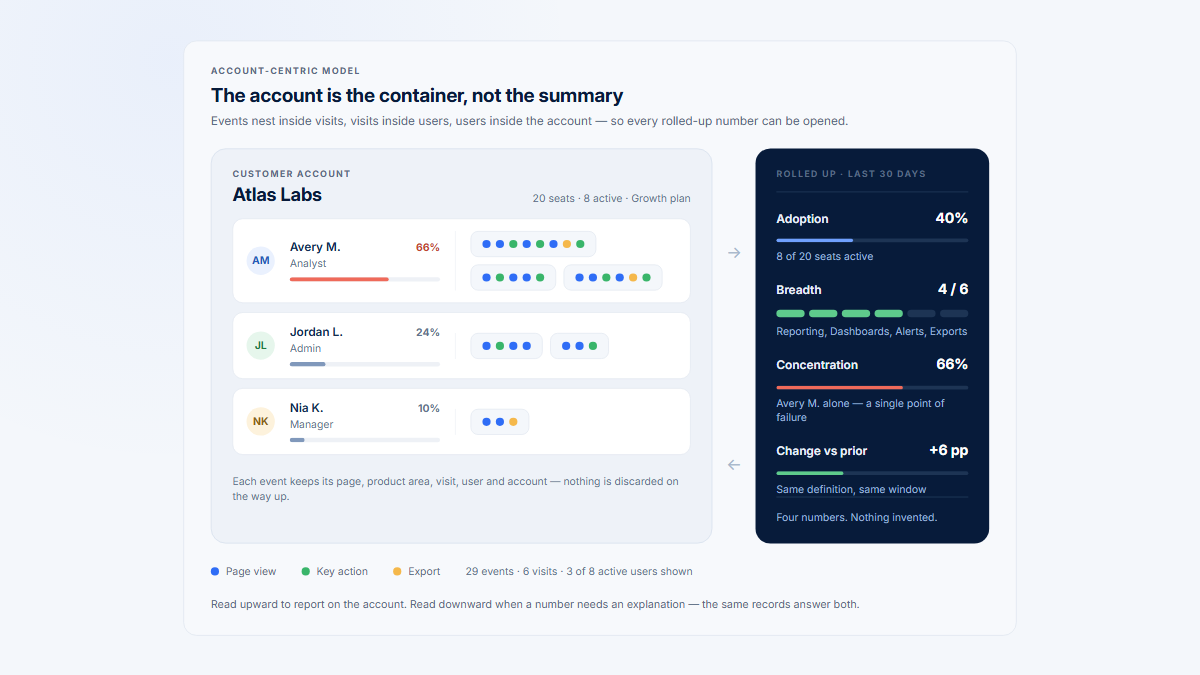
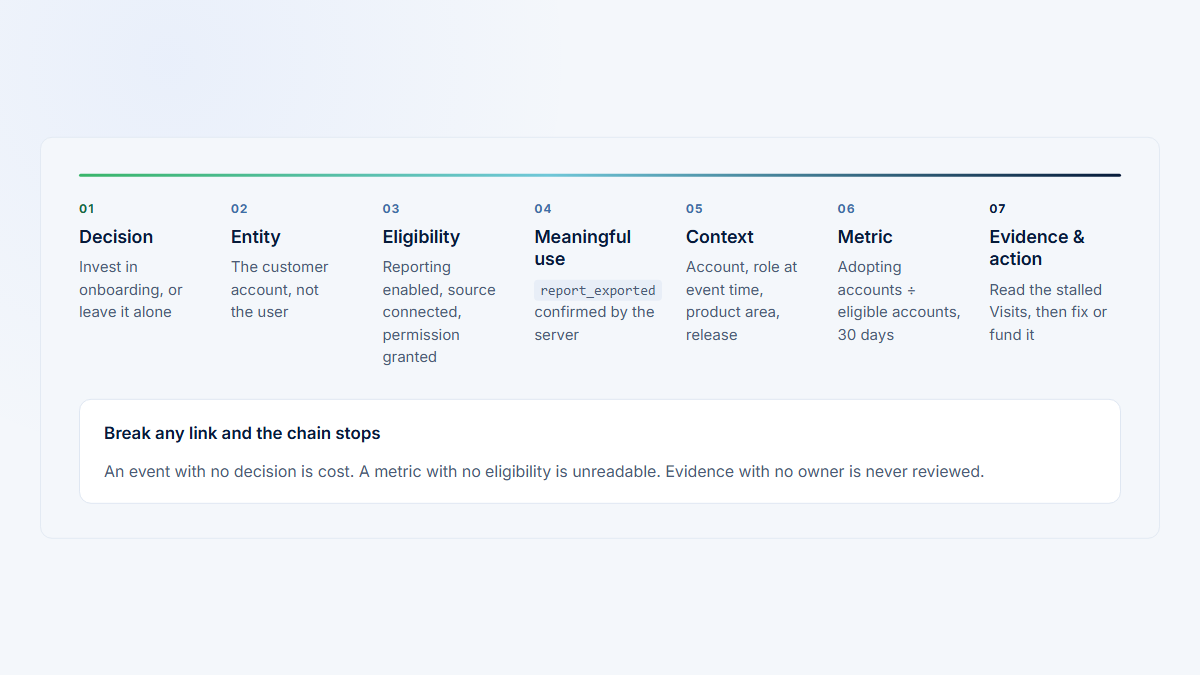
The goal is the smallest B2B product analytics model that can answer, without contradiction: which account owned this activity when it happened, and which person or service actor produced it?
Which entities belong in a B2B product model?
| Entity | Definition | Important distinction |
|---|---|---|
| Company | The commercial entity that buys, renews, expands, or churns. | It may be a legal organization, account, subsidiary, or other commercial relationship. |
| Workspace | The tenant, team, project, site, or operating group where work occurs. | One company may own several; in another product the workspace itself may buy. |
| User | A stable identified person or service actor. | The user is not the user's relationship to a workspace. |
| Membership | The user-to-company or user-to-workspace relationship. | Role, permissions, status, and validity belong here and can change. |
| Visit | A sequence of activity by one actor within a defined window and context. | A workspace switch must not blend two customer contexts. |
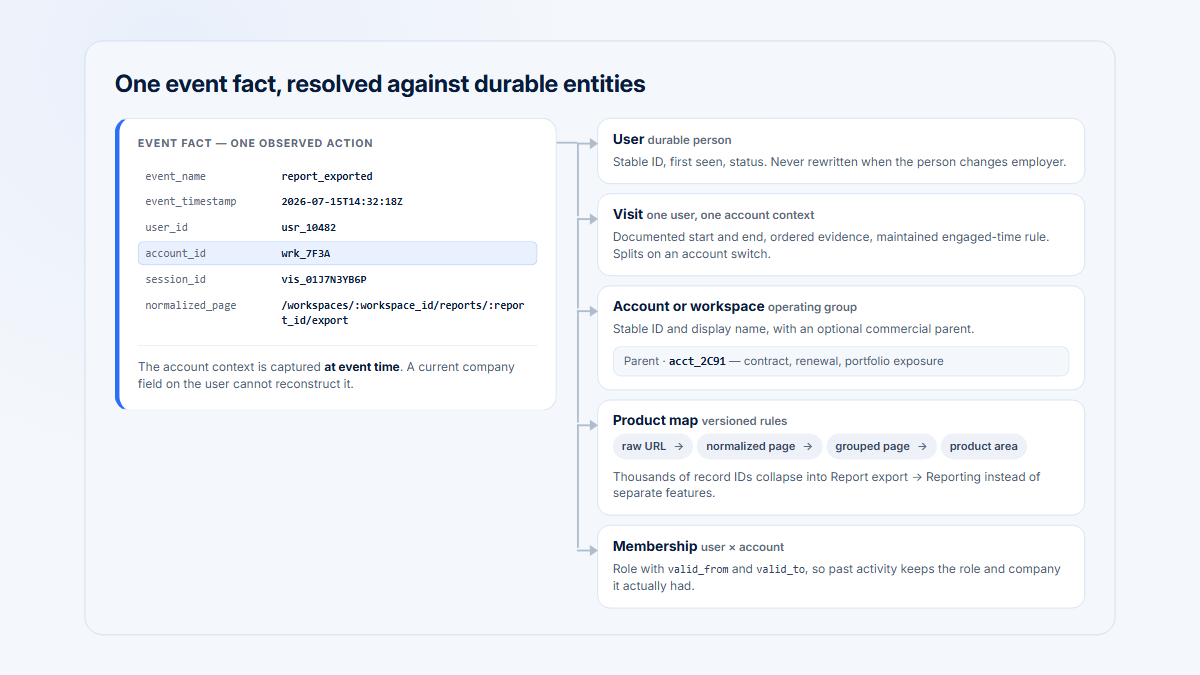
| Event | An observed action with timestamp, actor, and analytical context. | Current profiles may enrich it but must not silently rewrite event-time facts. |
Product area and grouped feature are analytical dimensions rather than identity entities. Together they answer who acted, for which account and workspace, during which Visit, and in which part of the product.
| Question | Likely owner | Why it stays separate |
|---|---|---|
| Who buys or renews? | Company or commercial account | Commercial responsibility may span several operating groups. |
| Where are data and permissions isolated? | Workspace, tenant, project, or site | One buyer can have independent product contexts. |
| Who performed the action? | User or typed service actor | The actor can participate in several accounts. |
| What role did the actor have then? | Effective-dated membership | Roles and permissions change without changing the person. |
| Which sequence contained the action? | Visit | Sequence and boundaries are derived separately from identity. |
Write one sentence defining each entity in product language and one sentence defining its reporting use. If Company and Workspace always resolve to the same stable object, one identifier may be enough. Add a separate level only when the product or commercial relationship genuinely needs it.
Why does one user-to-one-company modeling fail?
A static company_id stored only on the user profile cannot reliably attribute historical events.
| Situation | Failure of one permanent company field |
|---|---|
| Consultant or agency user | The same person acts for several customers, sometimes in one day. |
| Employee in several workspaces | The operating context cannot be inferred from identity alone. |
| Administrator across subsidiaries | Both commercial parent and operating child may matter. |
| Platform support or impersonation | Staff behavior can look like customer adoption. |
| Personal and company workspaces | One identity produces activity for different account types. |
| User changes employer | Joining events to the current profile moves old activity to the new employer. |
| External collaborator | One person legitimately belongs to unrelated organizations. |
| Parent with child organizations | A flat field loses hierarchy and active operating context. |
Segment, Mixpanel, and PostHog group models all separate the user from group context. A current company profile can still support a directory or default selection; it cannot be the only historical attribution source.
Also separate the commercial account from the operating workspace when they answer different questions:
- One company and one workspace may need only one ID.
- One enterprise contract with ten workspaces needs both
company_idandworkspace_id. - One subscription per workspace may make the workspace the commercial account.
- Parents, subsidiaries, franchises, locations, or transferable workspaces need explicit, possibly effective-dated ownership.
Ask who pays and renews, where data and permissions are isolated, whether one buyer owns several groups, whether ownership can change, and whether reports need current hierarchy, historical hierarchy, or both.
| Event-time fact | Later change | Historical result |
|---|---|---|
| A consultant exports a report for Lumen. | The consultant next works in Northstar. | The export remains Lumen activity because its event carried Lumen context. |
| An analyst publishes in the Research workspace. | The analyst leaves and joins another company. | The publication remains with the former workspace and company. |
| A workspace belongs to Subsidiary A. | It transfers to Subsidiary B after an acquisition. | Historical ownership follows the effective-dated hierarchy unless a report explicitly asks for current rollup. |
| Support impersonates a customer user. | The support case closes. | The event remains auditable but stays excluded from customer adoption. |
What does a practical conceptual schema look like?
Company (commercial account)
  1 ---< many Workspaces

User
  many >---< many Workspaces through Membership

Workspace
  1 ---< many Visits

Visit
  1 ---< many Events

Event ---> one active Workspace context
Event ---> one Company context when relevant
Event ---> one User when identified
Event ---> one Product area or grouped feature
Six concepts, and which ones nest
User — one stable record per person
Membership — one per relationship, with a role and a validity range
Northstar / Operations
manager · from Jul 20
Lumen / Client Portal
external collaborator · from Jun 2
Company → Workspace → Visit → Event — these contain one another
Company · Northstar
Workspace · Operations
Workspace · Research
Company · Lumen
Workspace · Client Portal
one event
Each event stores the context that was true when it happened
The names and tables can differ. The invariant is that identity, membership, operating context, commercial context, and observed behavior are not collapsed into one mutable profile.
How should events preserve account context?
Every important event should include, or be reproducibly resolvable to, the active company, workspace, actor, Visit, timestamp, environment, actor type, product area, and grouped feature.
{
  "event": "dashboard_shared",
  "occurred_at": "2026-07-29T10:14:22Z",
  "project_id": "project_014",
  "user_id": "usr_1842",
  "company_id": "company_0298",
  "workspace_id": "workspace_041",
  "membership_role": "manager",
  "visit_id": "visit_7711",
  "product_area": "Reporting",
  "grouped_page": "Dashboard",
  "actor_type": "customer",
  "environment": "production"
}
The IDs describe where the action belonged at occurred_at, not whatever company is currently stored on the user. Either snapshot essential context on the event or join to the effective-dated membership valid at that timestamp. The answer must remain reproducible next month.
When a person switches workspace, update context before the next event. If one browser Visit can cross workspaces, event-level context must be authoritative.
One person, one day, two accounts
Attributed by the context active at each event
Northstar / Operations
3 events
Lumen / Client Portal
3 events
09:0011:0013:0015:0017:00
Attributed by the workspace stored on Maya’s profile tonight
Lumen / Client Portal
6 events
Northstar loses its whole day. Three of six events are now on the wrong customer, and nothing in the data says so.
Define attribution precedence for disagreements. A trusted event-time workspace usually outranks the user's current default; a valid supplied Visit context outranks a stale browser property; and an effective-dated membership can enrich an event only when the membership was valid at that timestamp.
| Conflict | Safe treatment |
|---|---|
| Event workspace is missing but a valid Visit has one account context. | Enrich under a documented rule and retain an attribution-source flag. |
| Event workspace conflicts with the current user default. | Keep the event-time context; investigate the stale profile separately. |
| Event context has no valid membership at that time. | Quarantine or flag it; do not silently assign a convenient account. |
| A single Visit contains two trusted workspace contexts. | Split the Visit at the switch for account-level analysis. |
| Only email domain or IP address suggests an account. | Leave company attribution unknown unless a reviewed identity process confirms it. |
How should identity and membership history be maintained?
| Entity | Stable key | Mutable attributes |
|---|---|---|
| User | user_id | Name, email, title, locale, status |
| Company | company_id | Name, domain, plan, owner, lifecycle |
| Workspace | workspace_id | Name, slug, region, parent |
| Membership | membership_id or stable composite | Role, permission, status, validity |
| Visit | visit_id | Derived duration, end reason, labels |
| Event | event_id | Treat as immutable under an explicit correction policy |
Names, emails, and domains are poor join keys. They change, collide, are shared, and do not represent memberships. Use them as attributes or reviewed onboarding suggestions, not silent historical attribution.
membership_id
user_id
workspace_id
role
permissions
status
source
invited_at
joined_at
left_at
valid_from
valid_to
Version a membership or keep a history table when role, access, or status changes. Close its validity range rather than deleting it. Type 2 slowly changing dimensions and dbt snapshots are possible implementation patterns; preserving the previous state is the transferable requirement.
Roles change, so memberships get validity ranges
Maya
Northstar / Operations
Alex
Northstar / Research
Alex
Harbor / Main
Sam
Support, impersonating
Jul 1Jul 8Jul 15Jul 22Jul 29
Alex joining Harbor on Jul 22 does not move the Jul 16 report to Harbor. Closing the old range keeps it where it happened.
Northstar ends the month with 3 customer events and 2 active users — Sam’s support event is auditable but not adoption.
Link anonymous behavior only after trustworthy authentication or signup, using the analytics system's supported identity method. Rotate browser identity on logout when devices may be shared. Do not merge people or companies from IP address, domain, or another weak signal.
How should organizational change and non-customer actors work?
Merges, splits, acquisitions, hierarchy changes, workspace transfers, and deletions need an audit policy. Preserve original event attribution; maintain canonical IDs and aliases for selected current reports; effective-date ownership; and label current-portfolio versus historical-structure views.
Do not destructively rewrite all events without a recovery path. Product, finance, customer success, legal, and data teams may need different views of the same organizational history.
| Change | Minimum audit record | Reporting choice |
|---|---|---|
| Company merge | Source IDs, canonical ID, effective time, reason, and approver | Offer original-account and current-rollup views. |
| Company split | New entities, membership and workspace mapping, effective time | Preserve past ownership; route future activity explicitly. |
| Workspace transfer | Old parent, new parent, effective interval, and validation | Choose event-time or current parent deliberately. |
| User merge | Source identities, surviving ID, evidence, and reversal path | Recompute distinct people only under the correction policy. |
| Deletion or privacy request | Request scope, processing state, and allowed residual aggregates | Follow the retention and legal policy, not an ad hoc rewrite. |
actor_type: customer | employee_support | service | integration | bot | test
access_mode: normal | impersonated | support
environment: production | staging | demo | test
is_internal: true | false
is_test: true | false
Support and automation events can remain available for audit without entering customer adoption. Avoid an email-domain-only exclusion; it misses service identities and can remove legitimate customers. Capture only necessary data and apply masking, sanitization, hashing, encryption, or exclusion to sensitive fields.
How do you count companies and users correctly?
| Metric | Definition |
|---|---|
| Created companies or users | Records created, regardless of eligibility or activity. |
| Eligible companies or users | Entities remaining after plan, lifecycle, actor, environment, status, and test rules. |
| Active companies or users | Distinct eligible IDs with at least one valid product Visit during the complete period. |
| Companies using a feature | Distinct eligible companies meeting that feature or area threshold. |
| Users inside adopting companies | Eligible members of adopting companies; not necessarily the people who used the capability. |
COUNT(DISTINCT company_id)
for eligible production customer activity
across the complete selected period
Do not sum daily uniques. If Monday has Northstar and Lumen and Tuesday has Northstar and Harbor, daily counts sum to four but the two-day distinct total is three.
One multi-account person can count in several company-level user totals but only once globally. State whether the grain is people, memberships, or account-user contributions. The account versus user adoption guide explains the analytical consequences; the instrumentation plan guide covers implementation.
What does the Northstar example prove?
All companies, users, events, and dates are fictional.
| Date | Actor and action | Company / workspace | Context |
|---|---|---|---|
| July 3 | Maya: project_created | Northstar / Operations | member |
| July 9 | Maya: client_report_exported | Lumen / Client Portal | external_collaborator |
| July 14 | Sam: settings_opened | Northstar / Operations | Support impersonation |
| July 16 | Alex: report_published | Northstar / Research | analyst |
| July 18 | Alex membership ends | Northstar / Research | left |
| July 20–21 | Maya becomes manager, then shares dashboard | Northstar / Operations | manager |
| July 22–24 | Alex joins Harbor, then views dashboard | Harbor / Main | member |
- Northstar has three customer events, two active customer users, and two active workspaces.
- Sam's support event is retained but excluded from customer usage.
- Alex's July 16 action remains Northstar history after Alex joins Harbor.
- Maya's July 3 event keeps the member role; July 21 keeps the manager role.
- Maya and Alex are two global people, but Northstar, Lumen, and Harbor contain four account-user contributions.
These results are possible only because events retain account context, memberships have validity, and actor classification remains separate from the workspace being supported.
How do you validate and use the model?
- Test account switching, multi-membership users, role changes, departures, and workspace transfers.
- Confirm every event's company, workspace, actor, Visit, environment, and timestamp are valid.
- Reconcile raw event counts with excluded support, service, bot, demo, and test activity.
- Verify current and event-time queries intentionally differ where history changed.
- Check uniqueness, orphan memberships, overlapping validity ranges, stale context, and daily-unique summation.
| Test case | Expected invariant | Failure detected |
|---|---|---|
| User switches workspace mid-browser session. | Later events use the new workspace and account; the Visit splits if required. | Cross-account blending |
| User changes role on July 20. | Earlier events retain the earlier role; later events use the new role. | Current-profile history rewrite |
| User leaves one company and joins another. | Old activity stays with the former company and new activity uses the new membership. | Employer reassignment |
| Support impersonates a customer. | The supported company remains visible, but actor type excludes the event from customer usage. | Internal activity leakage |
| One user belongs to three accounts. | Global distinct people equals one; account-user contributions can equal three. | Grain confusion |
| Daily distinct companies overlap. | The complete-period query deduplicates IDs across all days. | Summed-unique inflation |
Run these cases in staging and on a small production sample after identity, account-switching, hierarchy, or tracking changes. Keep raw event IDs and attribution-source flags so a failed aggregate can be traced and corrected.
Hymetry connects Companies, Users, Pages, and Visits so an account total can be traced to people, product areas, and sessions. See the companion guides to company-level usage and the B2B instrumentation plan.
Frequently asked questions
Should company_id be a user or event property?
A current company can enrich a profile, but event-time company or workspace context must drive historical attribution.
Do we always need company and workspace IDs?
No. Use both only when commercial and operating entities differ or ownership can change.
How should a multi-account user be modeled?
Keep one stable person, one membership per valid relationship, and the active context on each event.
What happens when a user leaves?
Close the membership validity range; normally keep past events with the company and workspace where they occurred.
Can email domain identify a company?
It can suggest a reviewed mapping, but public domains, consultants, subsidiaries, acquisitions, and multiple domains make it unsafe as the identity model.
How should anonymous activity count?
It may enter anonymous aggregate metrics, but not a known user or company until a trustworthy identification process links it.
How do we count unique monthly companies?
Count distinct eligible company IDs across the whole month; never sum daily distinct values.
Sources
Methodology
First-party specifications support the group, identity, event, session, history, and logging guidance. The conceptual schema, fictional examples, calculations, and visuals are original to this guide.
Source directory
- Twilio Segment Group specification
- Twilio Segment Identify specification
- Twilio Segment Alias specification
- Mixpanel Group Analytics FAQ
- Mixpanel data-model concepts
- PostHog group analytics documentation
- Snowplow user and session identifiers
- Snowplow unique identifiers and merge conflicts
- Snowplow atomic events table
- dbt snapshots documentation
- OWASP Logging Cheat Sheet
- Hymetry Companies documentation
- Hymetry Users documentation
- Hymetry Pages documentation
- Hymetry Visits documentation
- Hymetry demo Companies view
- Hymetry demo Users view