Define the four current engagement states
| State | Practical definition | It does not automatically mean |
|---|---|---|
| Active | Qualifying activity is consistent with expected role and workflow use in the selected period | Satisfied, retained, or not at risk |
| Light | Some meaningful activity exists, but frequency, breadth, or depth is below the Active rule | Unhealthy or disengaged |
| Passive | The user appears in the product but shows little qualifying interaction or workflow progress | Failed adoption or no value |
| Dropped | A previously engaged user has no qualifying activity across a role-appropriate drop window despite realistic opportunities to use the product | Deleted, churned, dissatisfied, or no longer employed |
For a daily analyst, Active may require work on several days and completed analysis actions. For a monthly billing administrator, one successful review may be enough. Passive dashboard consumption can be valuable for an executive. A weekly project manager should not become Dropped after five quiet days, but several missed expected cycles may justify the state.
Keep invited-but-never-activated and new/onboarding users separate. Dropped implies a prior qualifying baseline.
Keep the reason visible
Light and Passive are useful only when their reasons remain visible. “Light because the user is new and has completed two of five onboarding workflows” differs from “Light after breadth fell from four areas to one.” “Passive monthly viewer with a successful review outcome” differs from “Passive operator whose completions fell to zero.”
Separate current state from momentum
Current state answers “What level of role-appropriate engagement exists now?” Momentum answers “How is that evidence changing?” Use labels such as gaining, stable, declining, insufficient history, or a specific risk flag.
State ↓ · momentum →
Gaining
Stable
Declining
Active
Qualifying activity matches the role's expected use
Maya
Daily analyst · 18 days, 74 actions
Alex At risk
Still active, but actions down 45% and Reporting stopped
Light
Meaningful activity exists, below the Active rule
Sam
New specialist · progressing, insufficient history
Passive
Present in the product, little qualifying progress
Jordan
Monthly executive · consumption fits the role
Chris At risk
Page views steady, completions fell from 7 to 0
Dropped
Previously engaged, now nothing across the drop window
Priya
Weekly PM · three expected cycles missed
Two axes, never collapsed into one label: a user can be active and declining, or passive and perfectly stable.
An At-risk overlay should name the evidence: meaningful actions down materially, role-relevant area use stopped, expected cycles were missed, workflow completion fell, or activity became unusually concentrated. It is not a claim about future churn.
Momentum rules need a baseline that is meaningful for the role. Compare complete like-for-like periods and use both absolute and relative change. A drop from two actions to one is 50% but only one action; a daily operator falling from 80 to 40 meaningful actions may warrant different urgency. Preserve the counts behind the label.
Choose role-appropriate evidence
| Signal | Useful question | Caveat |
|---|---|---|
| Meaningful actions | Did the user progress or complete the relevant job? | Definition must be role-specific |
| Active days / Visit frequency | Did use recur at the expected cadence? | Many visits can reflect friction |
| Recency | How many expected cycles have passed? | Calendar days alone ignore cadence |
| Product-area breadth | Which relevant areas did the role use? | More breadth is not always better |
| Workflow completion | Did expected progress reach a valid outcome? | Instrumentation may miss alternate paths |
| Observed engaged time | Was meaningful visible interaction observed? | Not equivalent to attention or value |
| Trend | How does current behavior compare with the user's baseline? | Partial periods and releases can distort change |
Make evidence inspectable: qualifying action names, active days, used areas, last qualifying date, comparison period, rule version, exclusions, and confidence. Exclude or label bots, integrations, staff, support impersonation, sandboxes, duplicated identities, and invalid events.
No single signal should silently dominate every role. Active days can show recurrence but not progress; Visits can expose frequency but also repeated friction; observed engaged time excludes idle periods but is not attention; breadth can be healthy or irrelevant; completion can be missed by imperfect instrumentation. Use a small role-specific rule and preserve the underlying dimensions.
Version each role rule
A role rule record should name the eligible population, qualifying actions or outcomes, expected cadence, current period, comparison period, Active and Light thresholds, Passive conditions, Drop window, risk overlays, exclusions, minimum history, rule version, and owner. Store the explanation produced by the rule alongside the label.
Apply eligibility, role, and lifecycle first
Before classification, establish that the user belongs to the account, had access and permission, was expected to perform the workflow, and had a realistic opportunity during the period. Segment rules by role and cadence rather than ranking everyone against a daily-operator threshold.
- Stable user and company IDs
- Role at the time of activity
- Relevant product areas and permissions
- Expected daily, weekly, monthly, quarterly, or event-driven cadence
- Lifecycle state: invited, onboarding, established, reactivated, or leaving
- Complete and comparable periods
- Human versus automation/support activity
- Known leave, role change, workspace move, or account migration where available
Step 1
Who is even eligible?
- account membership
- permission
- role at activity time
- expected cadence
- lifecycle stage
- complete period
Removed first: bots, integrations, staff and impersonation, sandboxes, invited-but-never-activated
Step 2
What counts as meaningful for this role?
One threshold for everyone ranks a monthly viewer against a daily operator.
Output A · current state
- Active
- Light
- Passive
- Dropped
Output B · momentum, calculated separately
- ↑ Gaining
- → Stable
- ↓ Declining
- Insufficient history
Worked B2B example
The users, accounts, and thresholds are fictional. They teach the method, not recommended defaults.
| User | Role / cadence | Current evidence | State | Momentum | Reason |
|---|---|---|---|---|---|
| Maya | Daily analyst | 18 days, 74 actions, 4/4 relevant areas, today | Active | Stable | Recurring broad role-appropriate work |
| Alex | Weekly rollout administrator | 9 days, 21 actions, 3/5 areas; actions down 45% | Active | Declining / At risk | Still active, but Reporting stopped |
| Jordan | Monthly executive viewer | 1 day, 3 report views, stable cycle | Passive | Stable | Consumption may fit the role |
| Sam | New implementation specialist | 4 days, 8 actions, 2/5 areas; growing from a partial prior period | Light | Gaining / insufficient history | Below mature rule but progressing |
| Priya | Weekly project manager | No activity for 24 days after 11 days/36 actions | Dropped | Declining | More than three expected cycles missed |
| Chris | Weekly operations contributor | Page views stable; completions fell from 7 to 0 | Passive | Declining / At risk | Presence remains, progress stopped |
Maya
Daily analyst
18 active days · 74 meaningful actions · 4 of 4 relevant areas · last today
Active→ Stable
Alex
Weekly rollout admin
9 active days · 21 actions · 3 of 5 areas · actions down 45%, Reporting stopped
Active↓ Declining · at risk
Jordan
Monthly executive viewer
1 active day · 3 report views · cycle unchanged for six months
Passive→ Stable
Sam
New implementation specialist
4 active days · 8 actions · 2 of 5 areas · growing from a partial first period
Light↑ Gaining · thin history
Priya
Weekly project manager
Nothing for 24 days after 11 days and 36 actions · three expected cycles missed
Dropped↓ Declining
Chris
Weekly operations contributor
Page views unchanged · completions fell from 7 to 0
Passive↓ Declining · at risk
Same product, six different investigations. The volume of activity decides nothing until role, cadence, and completion are applied.
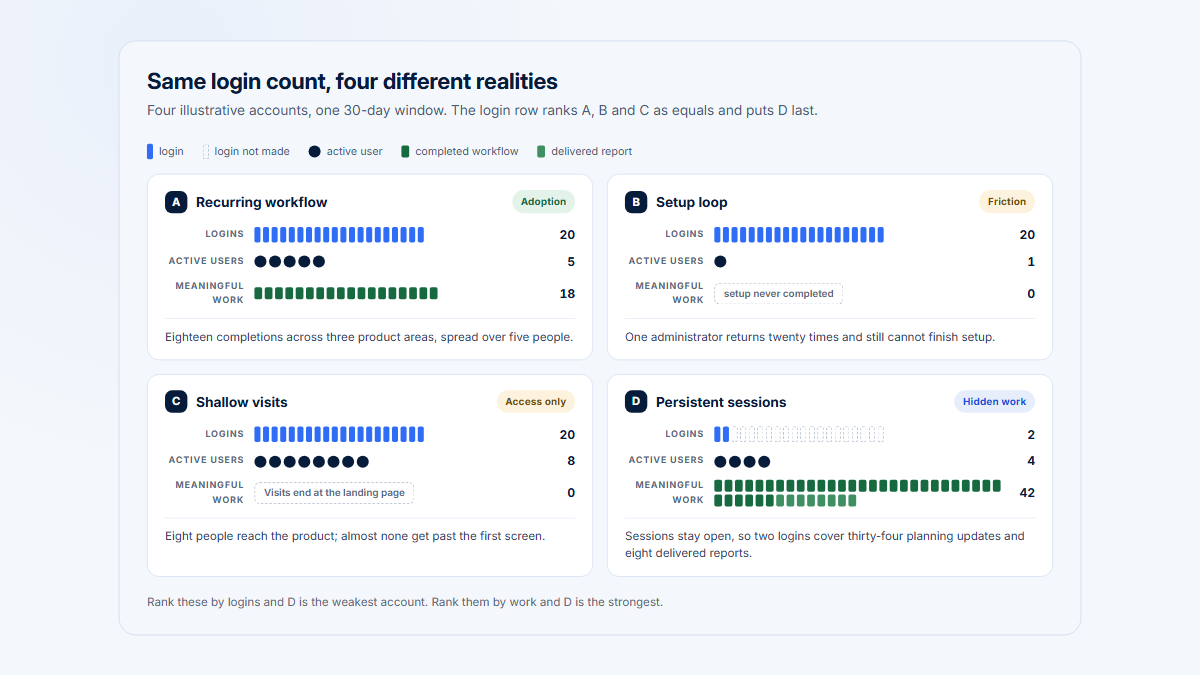
Priya's absence supports Dropped only because she was previously active and missed several weekly cycles. Jordan's sparse behavior may be appropriate for monthly consumption. Chris shows why login and page views can conceal lost workflow progress. Each label routes a different investigation.
Alex is the key two-axis case. He still crosses the Active rule with nine days and 21 meaningful actions, yet actions fell 45% and Reporting stopped. Replacing Active with At risk would erase current behavior; omitting the decline would erase direction. “Active + declining” preserves both facts.
Build a transparent and stable classification process
- Define eligible role groups and expected cadence.
- Name qualifying actions, progress, or consumption outcomes.
- Select complete current and comparison periods.
- Apply state rules to valid human behavior.
- Calculate momentum separately from state.
- Add rule-specific At-risk reasons and confidence.
- Preserve evidence and alternative explanations.
- Review the user's Company and selected Visits before action.
- Version rules and monitor distribution changes.
Prevent status flapping with hysteresis: use different entry and exit thresholds where appropriate, require a minimum duration or multi-period confirmation, and preserve the previous state when history is insufficient. Do not invent a stable trend for a new user or compare partial onboarding periods as if they were mature baselines.
For example, a weekly user might enter Dropped only after three missed expected cycles but exit after one verified meaningful return. A declining flag might require two completed periods below the baseline, unless an abrupt stop in a critical workflow warrants earlier review. Document these choices; they are operating rules, not universal truths.
Monitor classification drift
Monitor label distributions when rules, instrumentation, roles, or product taxonomy change. A sudden portfolio-wide movement may be a data issue rather than real behavior. Keep the previous rule version and effective date so historical analysis remains interpretable.
Recalibrate only with evidence. Compare classifications with known workflows and customer context, inspect false positives and false negatives, and review whether roles or product behavior changed. Avoid tuning thresholds simply to create a preferred percentage of Active users.
Interpret users inside their company
A user status is incomplete without account context. One Dropped specialist may be offset by a successful role transition, or may expose a serious champion dependency. Several Light users may represent healthy occasional participation. Review company adoption, eligible roles, product-area distribution, concentration, ownership, and relevant Visits.
Ask whether another user took over the workflow, whether outputs continue, whether the account changed teams or workspaces, and whether the role is still eligible. A user-level signal becomes operational only when the account-level consequences and appropriate next action are understood.
Choose the next account action
Possible next actions include no action, instrumentation repair, role or identity correction, onboarding support, workflow research, backup-owner enablement, product investigation, or a customer question. Do not automatically message a user from a status change; review purpose, context, and privacy first.
At the company level, summarize the distribution of states by eligible role rather than counting every user record. A healthy account might contain one Active administrator, several Active operators, and Passive executive viewers. The same mix is concerning only if the intended workflow requires broader participation or continuity is fragile.
Inspect the supporting evidence
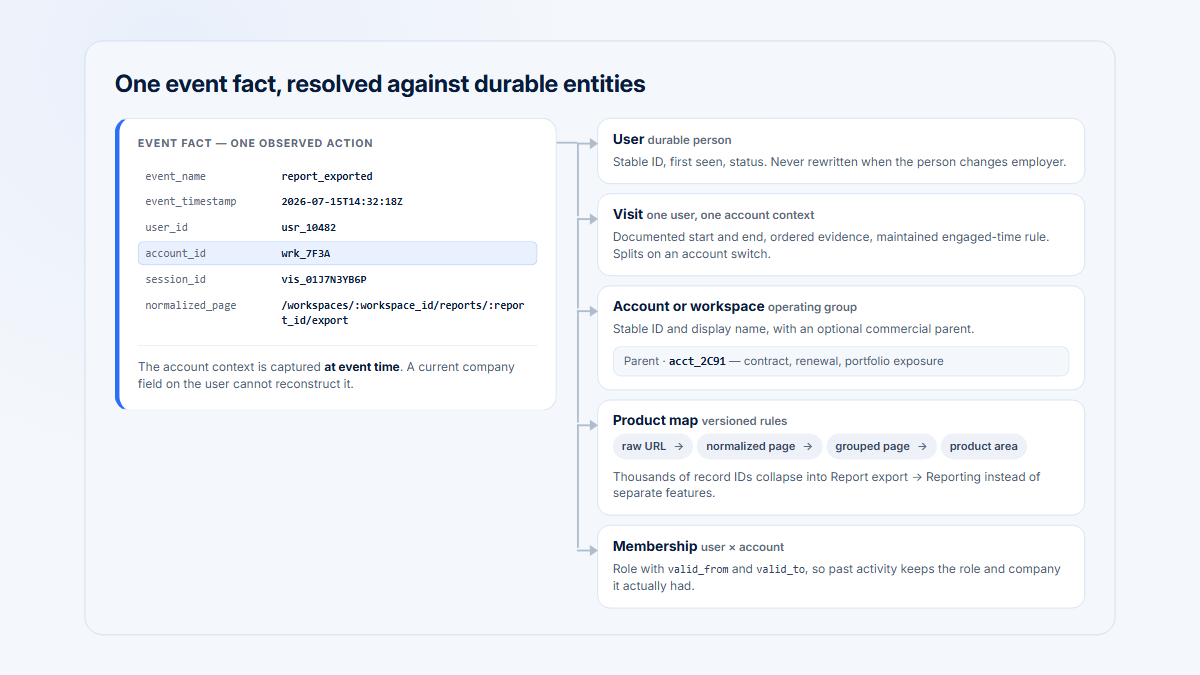
Hymetry connects Users to Companies, grouped Pages and product areas, and Visits. Teams can inspect why a state was assigned and whether the account pattern supports action. The product does not turn behavioral labels into deterministic health or retention outcomes.
Frequently asked questions
What is an Active user in SaaS?
A person whose qualifying activity matches the expected role and workflow cadence during the selected period—not merely someone who logged in.
What is the difference between Light and Passive?
Light has some meaningful activity below the Active threshold. Passive shows presence or consumption with little qualifying progress. Role definitions can move consumption between them.
When should a user be Dropped?
After a previously engaged person has no qualifying activity across a role-appropriate window despite realistic opportunities to use the product.
Can an Active user also be At risk?
Yes. Current activity can remain above the Active rule while meaningful actions, breadth, completion, or recurrence declines materially.
Is login count ever useful?
It can confirm access or recency, but rarely proves progress or value. Pair it with role-relevant meaningful activity.
How should monthly or quarterly users be classified?
Use the expected business cycle and a long enough period. Do not punish healthy low-frequency roles with daily or weekly thresholds.
Should user status and company health use the same rules?
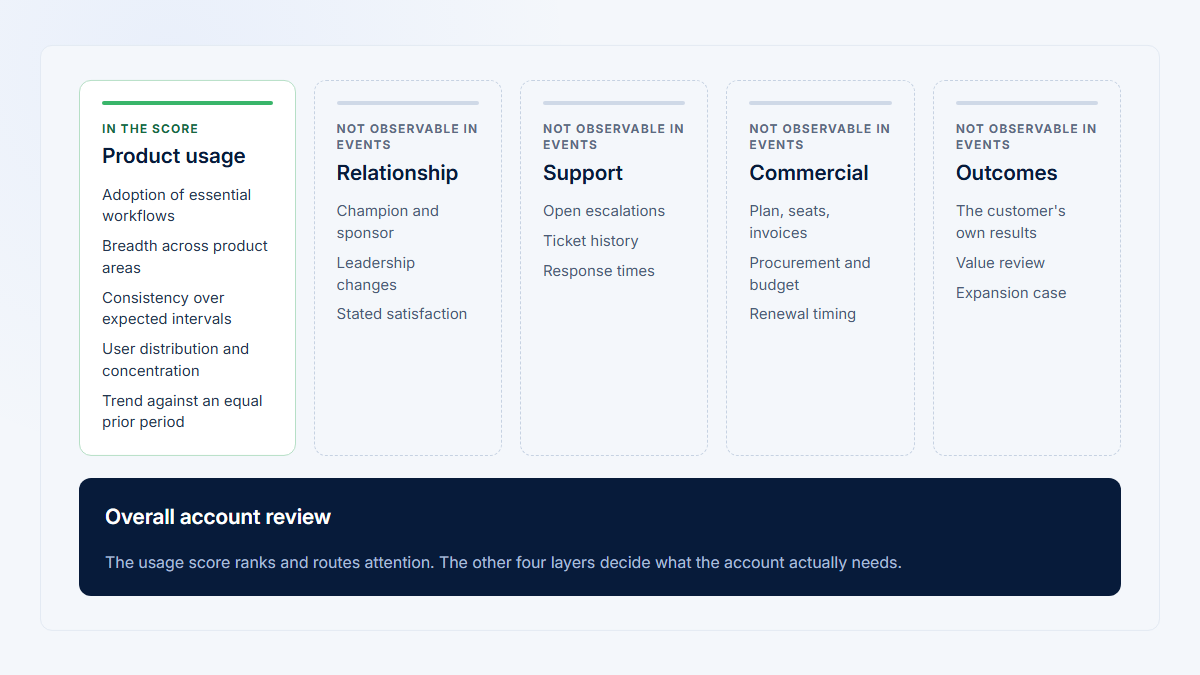
No. User status describes one person's observed behavior; account health combines company-level adoption, distribution, outcomes, relationship, support, and commercial context.