Different tracking signals answer different questions
| Signal | Best for | Can confirm | Cannot prove by itself |
|---|---|---|---|
| Page view | Reach, navigation, discovery, sequence | A normalized product surface became current | Interaction, completion, or value |
| Autocapture | Broad interface evidence and unexpected questions | An observed UI interaction under capture rules | Backend persistence or stable semantic meaning |
| Custom client event | Intent and client-owned product concepts | The browser observed the defined action | Asynchronous or server-owned success |
| Custom server event | Persisted outcomes, jobs, imports, exports, integrations | The exact backend outcome in its definition | The preceding interface path or user intent |
| Product state | Current configuration, eligibility, and durable conditions | The modeled state | Who changed it or the complete history without transitions |
| Session replay | Qualitative path and friction evidence | What the recorder retained in one Visit | Population prevalence, intent, or backend truth |
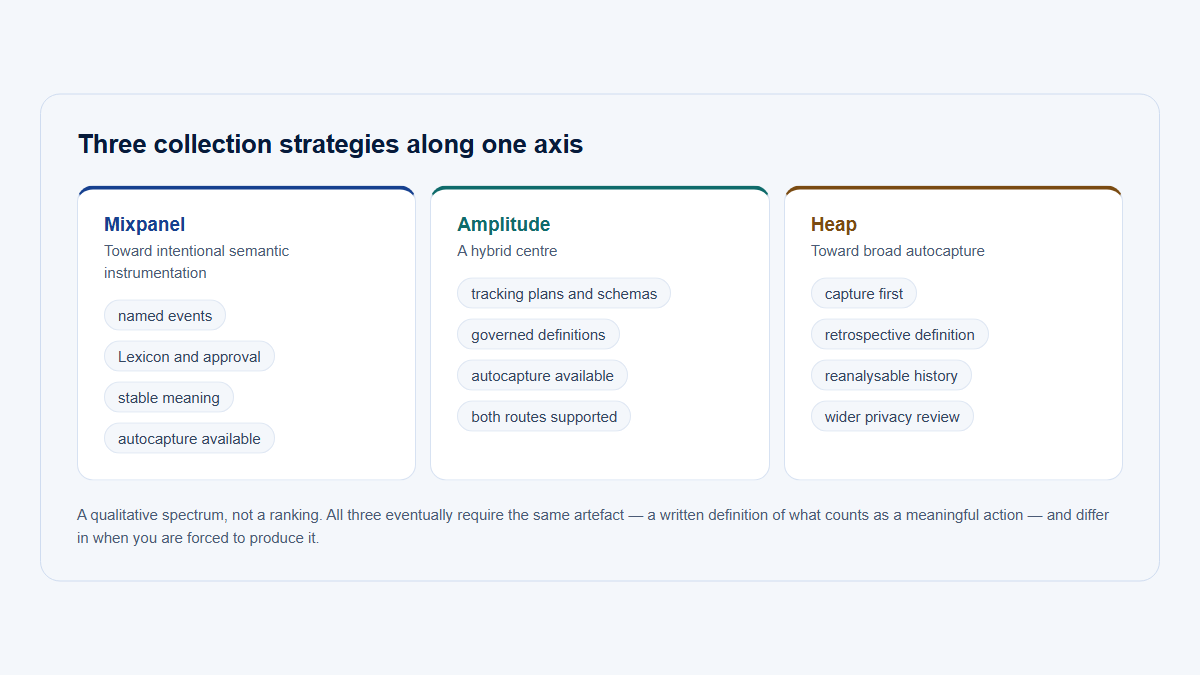
Autocapture is useful early because it collects selected interactions without a named event for each one. Its semantics often depend on DOM structure, selectors, labels, URL state, and retention. Custom semantic events require more planning but create stable product concepts. Server events are strongest when the backend owns completion. None replaces a correct identity and account model.
One Export click, three records
Autocapture
Broad interface evidence, no name required
09:42:18 · browser
Provesa control matching that selector was clicked
Cannot saywhether an export exists
Custom client event
Product meaning declared in advance
09:42:18 · browser
Provesa named intent, unchanged by a redesign
Cannot saywhether the backend finished
Server event
The outcome the backend actually owns
09:42:58 · worker
Provesthe file exists and who it belongs to
Cannot saywhich path led to the request
09:42:21 — the user closed the tab. Two of these records were already written, and neither of them knew whether a file was ever produced. The third arrived forty seconds later from a worker, with no interface path attached. Counting any one of them alone answers a different question than the one that was asked.
Use a four-layer B2B tracking model
- Identity and account context: project, stable user, active company/workspace, membership or role, Visit, environment, and eligibility where required.
- Pages and product structure: privacy-safe raw route, normalized page, grouped feature/page, product area, and ownership.
- Broad behavioral evidence: selected autocapture, Visits, replay, transitions, and observed interaction.
- Semantic outcomes: custom client/server events, persisted state, completed workflows, recurrence, and observable business outcomes.
A strong investigation can use all four: select an eligible account, confirm it reached the Reporting area, inspect the interface path, and verify that the backend generated an export. A perfect server event assigned to the wrong workspace remains misleading, so identity is the foundation.
Four layers, one sentence that survives review
Identity and account context Who?
project · stable user · active company · role at event · Visit · environment
“An editor at Atlas Labs, inside one Visit…”
Pages and product structure Where?
privacy-safe route · normalized page · grouped page · product area · owner
…reached the report builder in Reporting…
Broad behavioral evidence What happened?
selected autocapture · Visit sequence · transitions · replay
…worked through the template picker and pressed Export…
Semantic outcomes What was confirmed?
custom client event · server event · product state · recurrence
…and the backend generated the export, again the next month.”
Layer 1 is not optional
Remove it and the sentence is about nobody. A flawless server event attached to the wrong workspace is not partly right — it is precisely wrong, and it will read as adoption.
Choose the tracking method with a practical framework
| Question | Primary signal | Add when needed |
|---|---|---|
| Which surfaces did users reach? | Normalized page views | Account and role context |
| What UI behavior occurred? | Selective autocapture | Replay for retained Visits |
| Did a stable product concept begin? | Semantic client event | Autocapture to explain the path |
| Did persistence or processing succeed? | Server event | Client intent plus correlation ID |
| Is a durable condition true? | Product state or state transition | Audit history |
| How did a session unfold? | Visit sequence/replay | Structured events for outcomes |
| Did value recur? | Recurrence query over confirmed outcomes | Opportunity and cadence model |
Autocapture stable controls that support exploration: navigation, selected interaction types, feature entry points, and permitted attributes. Handle free-form text, forms, rich editors, protected pages, dynamic selectors, and high-cardinality content conservatively. A “capture everything” default creates cost and privacy risk without creating reliable meaning.
Create custom events for stable customer jobs, important workflow stages, collaboration, durable object changes, and outcomes that drive adoption or retention analysis. Prefer server confirmation when the backend owns success. Keep automated actors explicit.
| Concept | Represents | Example | Use |
|---|---|---|---|
| Event | Point-in-time action or transition | report_saved | Completion and actors |
| State | Persistent condition | Integration is connected | Current eligibility/configuration |
| Sequence | Several workflow steps | Open → configure → save → export | Progression and drop-off |
| Recurrence | Behavior in distinct Visits or periods | Export in two monthly cycles | Trial versus repeated use |
Separate client intent from server confirmation
A user can click Export and close the tab before generation. A worker can finish later, fail, retry, or deliver through an automated schedule. Model those as distinct facts:
report_export_requested   # client intent
report_export_generated   # authoritative server success
report_export_failed      # controlled server outcome
Use a stable event or operation ID to correlate attempts with outcomes and deduplicate ambiguous retries. Choose one canonical producer per logical event. Never fire the same “success” event independently from client and server without reconciliation.
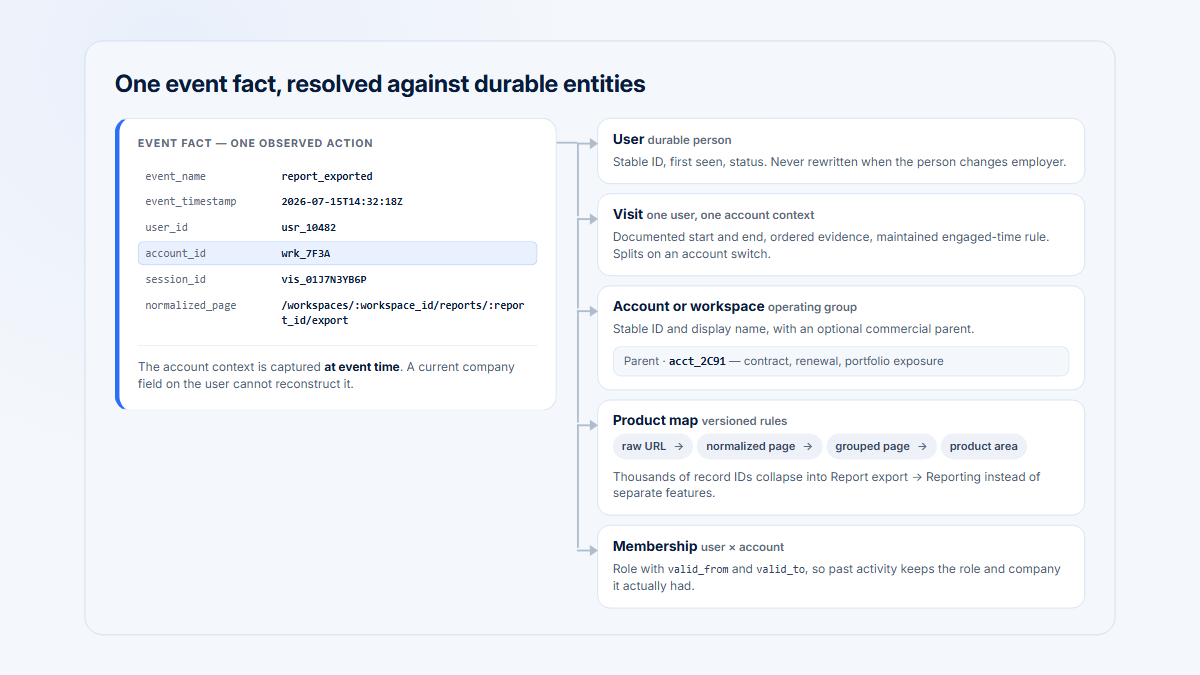
Attach the active account/workspace at event time. One user can belong to several companies or switch contexts during a Visit. Historical events should not be reassigned from the user’s current membership. Include event-time role and eligibility when the metric depends on them, plus a system actor for scheduled jobs or webhooks.
{
  "event": "report_export_generated",
  "event_id": "evt_01J...",
  "occurred_at": "2026-08-04T09:42:18Z",
  "project_id": "project_123",
  "account_id": "account_456",
  "user_id": "user_789",
  "originating_visit_id": "visit_abc",
  "product_area": "reporting",
  "grouped_page": "report_builder",
  "role_at_event": "editor",
  "eligibility_at_event": "enabled",
  "result": "success",
  "method": "manual_export",
  "application_version": "2026.08.0",
  "environment": "production"
}
This is illustrative, not a Hymetry SDK contract. Allowlist controlled properties with an owner. Exclude unrestricted objects, emails as primary IDs, secret-bearing URLs, customer-entered names or queries, tokens, stack traces with user data, arbitrary error messages, and unbounded text. High-cardinality IDs can be necessary for identity or deduplication; uncontrolled cardinality without analytical purpose is the problem.
Preserve identity and timing explicitly
Resolve anonymous-to-known identity according to a documented rule, and test logout, account switching, impersonation, shared devices, invitations, and merged users. Keep project and environment boundaries explicit so staging traffic cannot silently enter production metrics. When a server job finishes later, preserve both the occurrence time and the ingestion time; the latter helps diagnose pipeline delay but should not replace the business timestamp.
For asynchronous workflows, record a stable correlation ID from request through outcome. Define whether retries are separate attempts or one logical operation, how late successes are attributed, and whether a scheduled or API actor can satisfy the same metric as a human. These decisions change counts even when every payload is technically valid.
Plan for fragility, retroactivity, privacy, and cost
Autocapture definitions based on selectors, text, and DOM hierarchy can drift after a redesign. Prefer stable permitted attributes such as a deliberate data-analytics-id where appropriate, but treat that as a governed interface contract. Test definitions after releases and version material semantic changes.
“Retroactive analysis” means defining meaning over previously captured and retained evidence. It cannot recover an interaction, property, account context, outcome, or replay that was never collected or has expired. Historical UI changes can also make an old selector ambiguous. When an exploratory finding becomes an important metric, promote it to a stable semantic or server event.
Privacy controls
- Allowlist pages, elements, and properties.
- Mask or block before storage.
- Exclude protected routes and sensitive states.
- Remove secrets and unnecessary query parameters.
- Review replay, network, and console capture separately.
Volume controls
- Estimate page, interaction, event, and replay volume.
- Sample or suppress noisy low-value interactions.
- Set retention by purpose.
- Monitor cardinality, duplicates, and sudden spikes.
- Retire unused signals.
Privacy applies equally to client and server payloads. Server-side does not mean safe by default. Document purpose, access, retention, deletion, and regional requirements, and involve qualified privacy/legal review for the relevant jurisdiction.
Test a retrospective definition before trusting it
- Sample historical interactions across application versions and responsive layouts.
- Confirm that the required element, attribute, route, and account context were actually retained for the full analysis period.
- Compare the retrospective rule with a semantic or server-confirmed signal over an overlap window.
- Measure false positives caused by reused selectors, labels, modals, or embedded components, and false negatives caused by sampling or capture exclusions.
- Document the earliest trustworthy date and the versions covered.
Use the resulting metric as provisional when the overlap test is weak. Retrospective definitions are excellent for triage and hypothesis generation; they should not quietly become contractual KPIs merely because a chart can be produced.
Worked example: instrument a Reporting workflow
| Step | Layer | Signal | Supports | Does not prove |
|---|---|---|---|---|
| Open Reporting | Page | Report builder viewed | Reach/discovery | Configuration began |
| Select template | Autocapture | Template selected | Option interaction | A report was saved |
| First deliberate change | Client event | report_configuration_started | Intent/progress | Valid persistence |
| Save report | Server event | report_saved | Backend persistence | Output was used |
| Click Export | Client intent | report_export_requested | Attempt | Generation succeeded |
| Generate export | Server outcome | report_export_generated | Defined success | Recipient used it |
| Return next month | Recurrence | Completion in another period | Repeated use | Broad account participation |
Five accounts, seven steps, four defensible numbers
recordednot recorded×attempted, failedSsystem actor
80%
“Opened Reporting”page view
Atlas · Harbor · Northstar · Beacon
60%
“Clicked Export”client intent
Atlas · Harbor · Northstar
60%
“Export generated”server outcome
Atlas · Harbor · Meridian
40%
“A person generated one in two separate months”recurrence
Atlas · Harbor
The two 60% numbers are not the same 60%. Northstar clicks Export every week and never receives a file; Meridian receives one every month and never opens the product. An identical rate, a different set of accounts, and opposite follow-up actions — which is why the metric has to name its step.
| Account | Evidence | Interpretation |
|---|---|---|
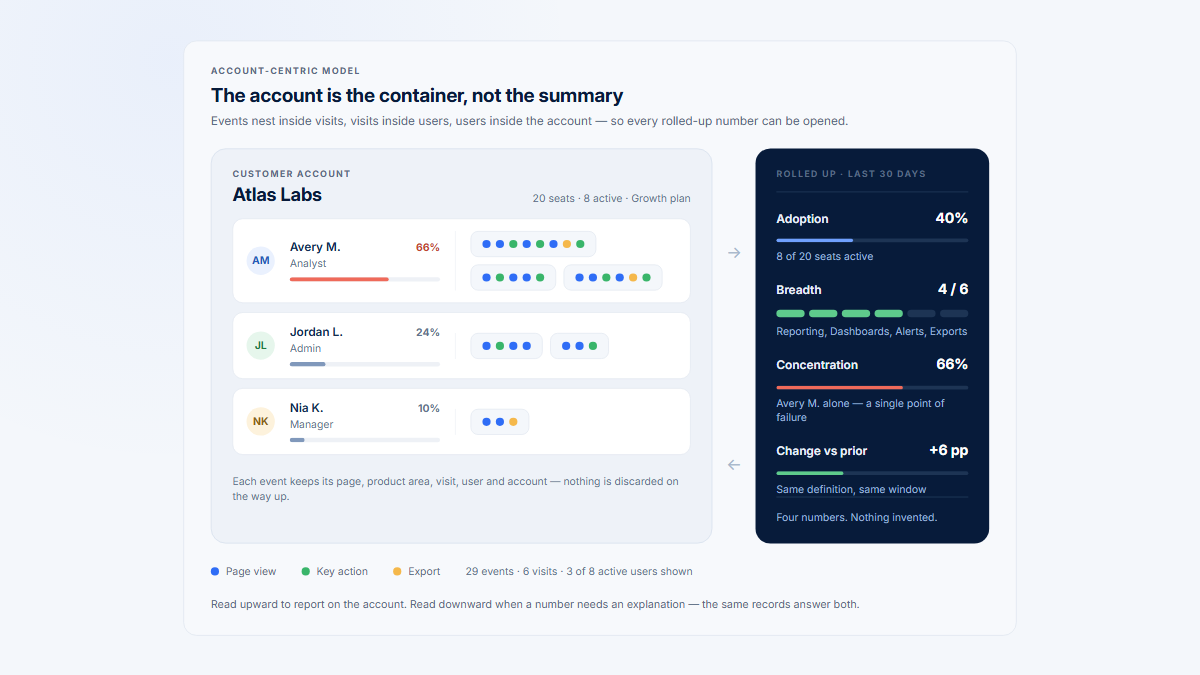
| Atlas Labs | Pages, configuration, saves, export, share, and next-month completion | Repeated account adoption; inspect penetration beyond two users |
| Northstar Works | Repeated Export clicks and requests, no generated outcome, controlled failures | Attempted but failed; clicks would overstate adoption |
| Beacon Systems | Repeated Report builder views, no start/save/output | Discovery, not meaningful adoption |
| Meridian Group | Little UI activity; scheduled reports delivered by jobs | Automated value, distinct from human engagement |
| Harbor Analytics | Saves and generated exports on month-end across three periods | Healthy monthly cadence; weekly inactivity is expected |
No single event answers reach, intent, persistence, outcome, automation, cadence, and distribution. Keep the layers connected and name the metric precisely.
Implement and govern the model
- State the decision and measured account/user entities.
- Normalize pages and product areas.
- Establish privacy-safe baseline page tracking.
- Enable autocapture selectively.
- Define the important workflows and eligibility.
- Add semantic client intent and server outcomes.
- Model persistent state and recurrence where an event is insufficient.
- Validate account context, actor, timestamps, and deduplication.
- Test raw data and representative Visits in production-like conditions.
- Document definitions, owners, schemas, privacy, and effective versions.
- Monitor quality, volume, drift, and unused collection.
Governance record for semantic events
For each event, keep its purpose, exact trigger, canonical producer, owner, entity, required and optional properties, allowed values, eligibility, exclusions, privacy classification, deduplication rule, validation evidence, and version history. Add deprecation and migration notes when semantics change.
Monitor missing identities, unknown account context, duplicate IDs, client/server mismatch, unexpected volume, invalid enums, timestamp delay, and events in the wrong environment. A schema can remain technically valid while its product meaning drifts after a redesign; review the metric contract with product changes.
Common tracking mistakes
- Treating every captured click as meaningful.
- Using only page views.
- Naming events after button labels.
- Firing success before server confirmation.
- Double-counting client and server completion.
- Losing event-time account context.
- Collecting sensitive DOM text or unrestricted properties.
- Claiming unlimited retroactivity.
- Ignoring automated workflows, cadence, or internal traffic.
- Building dashboards before validating triggers.
- Changing semantics without versioning.
Validate evidence before building the dashboard
Start with a small fixture matrix: one eligible human account, one ineligible account, one automated actor, one failed operation, one retry, and one account switch. For each case, compare the intended product action with the raw page, autocapture, client, and server records. Verify event order, event-time account context, actor type, controlled property values, deduplication, and environment. Inspect a representative Visit or replay only where policy permits.
Then reconcile aggregates in both directions. Sample dashboard rows back to raw evidence, and sample known product actions forward into the analysis. Check daily volumes by producer and application version, not just the total. Alert on missing identities, sudden selector loss, unexpected enum values, unusually late events, duplicate operation IDs, client requests without outcomes, and server outcomes without a traceable request when one is expected.
Compare old and new signals in parallel
Keep a short parallel-observation period when promoting an autocaptured definition to a semantic event. Plot both signals by account, role, application version, and day; investigate systematic differences instead of forcing the totals to match.
- Expect a semantic event to be narrower when it excludes disabled controls, failed operations, or repeated clicks.
- Record the overlap dates and the reason for the final boundary before updating funnels and alerts.
- Annotate the old and new series so a definition break cannot masquerade as a product trend.
After launch, review a small set of newly qualifying and newly non-qualifying accounts. This catches selector drift, account-context loss, eligibility changes, and background automation before a quarterly decision depends on them. Retire redundant evidence only after the replacement has passed that observation window and retention requirements are understood.
Ship a definition with an effective date and a named owner. If a redesign, queue change, permission change, or new automation alters meaning, version the metric or annotate the break. Backfills need the same review as live events: state the source, transformation, deduplication rule, affected dates, and limitations. This operational record is what makes a metric reproducible after the original implementer has moved on.
Connect product structure with behavioral evidence
Hymetry connects normalized and grouped Pages with Companies, Users, and Visits. Page evidence, account context, people, and session investigation remain distinct from authoritative semantic outcomes. Teams can review the demo project or open-source implementation.
Frequently asked questions
Should I use autocapture or custom events?
Use both selectively: autocapture for broad UI evidence and exploration; custom semantic and server events for stable intent and authoritative outcomes.
Can autocapture replace an instrumentation plan?
No. It does not define identity, account context, eligibility, business outcomes, cadence, privacy, ownership, or durable semantics.
Are server events always better?
No. They are stronger for server-owned outcomes but weaker for interface intent and path evidence. Client and server signals answer different questions.
Is a page view an event?
Technically it is often represented as one, but analytically it belongs to the reach/navigation layer and should not automatically count as adoption.
Can I define a custom event retroactively?
Only over captured, retained, and interpretable evidence. You cannot recover a missing property, server outcome, account context, or expired data.
How should multi-account users be tracked?
Use one stable user ID and attach the active account/workspace and role at event time. Do not rewrite history from current membership.
How do I avoid duplicate client and server events?
Give intent and outcome different names, choose one canonical producer per logical event, and correlate retries with stable event or operation IDs.
When should product state replace an event?
Use state for persistent conditions or eligibility reached through several paths. Keep transition events or audit history when who/when/path matters.
Sources
Method note: Vendor terminology and defaults differ. Official sources support implementation behaviors, not one universal tracking standard.
Methodology and evidence limits
The recommendations distinguish observable interface evidence, semantic intent, persisted outcomes, product state, and qualitative session context. Exact autocapture defaults, identity merge, retention, replay behavior, and query semantics vary by tool and version; test them in your environment.
Full source directory
- PostHog autocapture and event capture
- Mixpanel autocapture, tracking method, events and properties, and Lexicon
- Amplitude autocapture
- Segment Track, Page, Group, and common fields
- Snowplow events, entities, tracking design, tracking plans, automated testing, event fingerprints, and schema versioning
- rrweb guide and storage optimization
- PostHog data controls, MDN data attributes, HTML data attributes, and GDPR
Additional preserved references
These references supported the original detailed guide and remain available for claim verification and further reading.