Key differences
| Criterion | OpenReplay | LogRocket | Fullstory |
|---|---|---|---|
| Primary buyer | Platform, security, frontend engineering | Frontend engineering and support | Product, UX, digital experience, support |
| Center of gravity | Replay with deployment control | Developer diagnosis | Experience analysis |
| Developer evidence | Console, network, state, performance, sourcemaps | Issues, errors, console, network, performance | Dev Tools, console, network, search |
| Product/UX analysis | Trends and replay filters | Dashboards, funnels, paths, issues | Search, segments, funnels, journeys, frustration and AI workflows |
| Self-hosting | Available | Private-cloud/SaaS options; no customer-operated edition verified | No customer-operated option verified |
| Mobile | iOS, Android, React Native support | Supported mobile SDK and replay workflow | Mobile apps including current Flutter guidance |
| B2B account context | User metadata and custom data | User/session metadata and filters | User properties and search |
| Pricing model | OSS operations or cloud capacity/usage | Captured sessions, seats, retention, add-ons | Free allowance or custom packages/add-ons |
| Main trade-off | Operational burden | Cost at capture scale | Quote and implementation complexity |
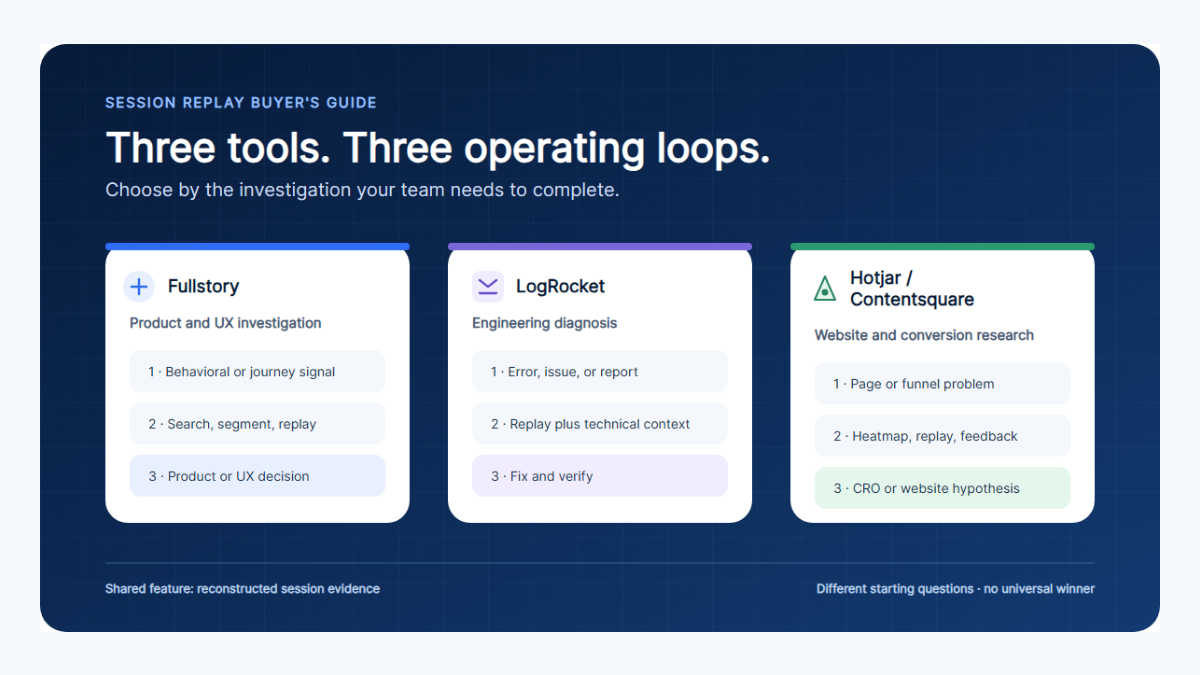
Choose the constraint you cannot compromise
OpenReplay
Nearest deployment control
LogRocket
Nearest frontend debugging
Fullstory
Nearest product and UX analysis
Editorial positioning, not a measured ranking. Each corner is the constraint that product optimises for — pick the one you are least willing to give up.
Decision by scenario
| Scenario | Start with | Why | Qualification |
|---|---|---|---|
| Self-hosted replay is mandatory | OpenReplay | Customer-operated deployment is a core option | Prove upgrade, backup, storage, and on-call ownership |
| Frontend defects dominate support | LogRocket | Replay is organized around errors and developer evidence | Test source maps, network redaction, and issue quality |
| Product and UX research program | Fullstory | Behavioral search and experience workflows are deepest | Define governance and expected captured-session volume |
| Small security-sensitive engineering team | OpenReplay pilot | Deployment control may outweigh convenience | Self-hosting does not remove privacy obligations |
| Web and native mobile debugging | LogRocket pilot | Managed developer workflow spans platforms | Run device-specific fidelity tests |
| Enterprise digital-experience team | Fullstory | Cross-functional analysis, governance, and data workflows | Check package boundaries and implementation services |
| B2B health or adoption reporting | Pair replay with event analytics | Replay explains a sampled visit, not account-wide adoption | Keep company identity and success events outside replay alone |
Replay, debugging, and product analysis
Session replay recreates an interaction from recorded browser or app state; it is not literal video and cannot guarantee perfect reproduction. The useful difference is what evidence and workflows surround the reconstruction.
| Investigation step | OpenReplay | LogRocket | Fullstory |
|---|---|---|---|
| Find a session | Filters, user data, events, and product trends | Issues, filters, users, funnels, and dashboards | OmniSearch, segments, events, frustration, and opportunities |
| Reproduce behavior | DOM replay with developer panels | Replay centered on frontend diagnosis | Replay centered on experience evidence |
| Inspect technical cause | Console, network, state, performance, sourcemaps | Console, network, errors, traces, performance | Dev Tools, console, network, and search |
| Quantify the pattern | Trends and external event analytics | Issues, dashboards, funnels, paths | Segments, funnels, journeys, and digital-experience analysis |
| Share evidence | Replay links within operated deployment | Issue/session links for engineering and support | Cross-functional session and segment workflows |
Privacy and self-hosting
All three offer masking, exclusion, or privacy controls, but defaults and coverage must be verified in the target SDK and UI. Treat text, inputs, URLs, network bodies, console messages, user properties, and screenshots as separate leak paths.
Managed service
- The vendor operates storage, backups, scaling, and upgrades.
- Deployment can be faster and support more standardized.
- Your team still owns consent, capture rules, roles, and retention choices.
- Review residency, subprocessors, export, and deletion terms.
OpenReplay self-hosted
- Your team controls infrastructure location and networking.
- Your team also owns Kubernetes/VM capacity, database and object storage, backups, monitoring, upgrades, and incident response.
- The repository uses mixed license files; inspect the exact deployed components.
- Infrastructure control does not make over-collection safe.
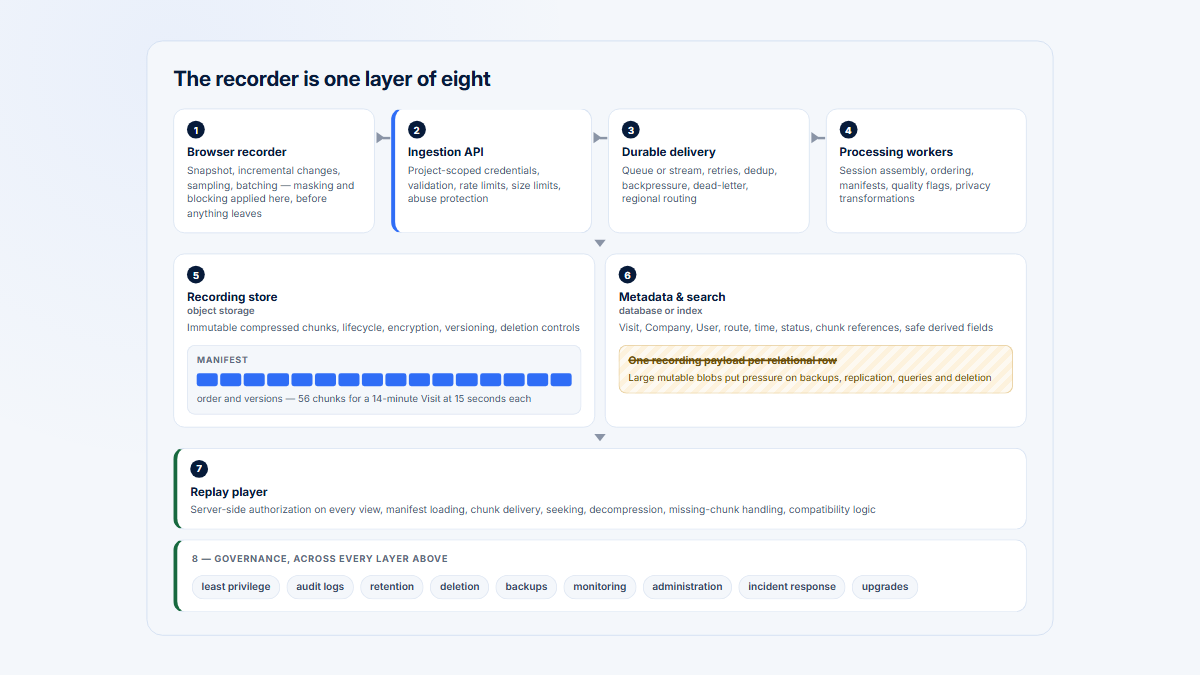
Operational ownership moves; accountability does not
Managed vendors operate
Self-hosted buyers own both layers
The buyer retains, in every model
Self-hosting changes operational ownership. Collection design and privacy accountability remain with the buyer in every model, which is why infrastructure location is a poor proxy for privacy.
Reliability and platform fit
Replay quality depends on the application, SDK, browser, device, and privacy configuration. Vendor support tables are a starting point, not an acceptance result.
| Risk | Test | Pass condition | Why it matters |
|---|---|---|---|
| SPA navigation | Route changes, lazy loading, modals | Replay and URLs stay synchronized | Most SaaS products rely on client routing |
| Multiple tabs | Cross-tab workflow and authentication | Timeline remains interpretable | Real work often spans tabs |
| Iframes | Same-origin and third-party embedded content | Known gaps are explicit | Payment and support widgets are common |
| Canvas/WebGL | Charts, editors, maps, or design surfaces | Critical interactions are visible or instrumented separately | DOM reconstruction cannot assume pixel fidelity |
| Mobile | Representative devices, gestures, crashes, slow networks | Supported evidence survives the target stack | SDK labels alone do not prove fidelity |
| Privacy | Inputs, URLs, network, console, properties, deletion | No prohibited value appears anywhere | A single untested channel can leak data |
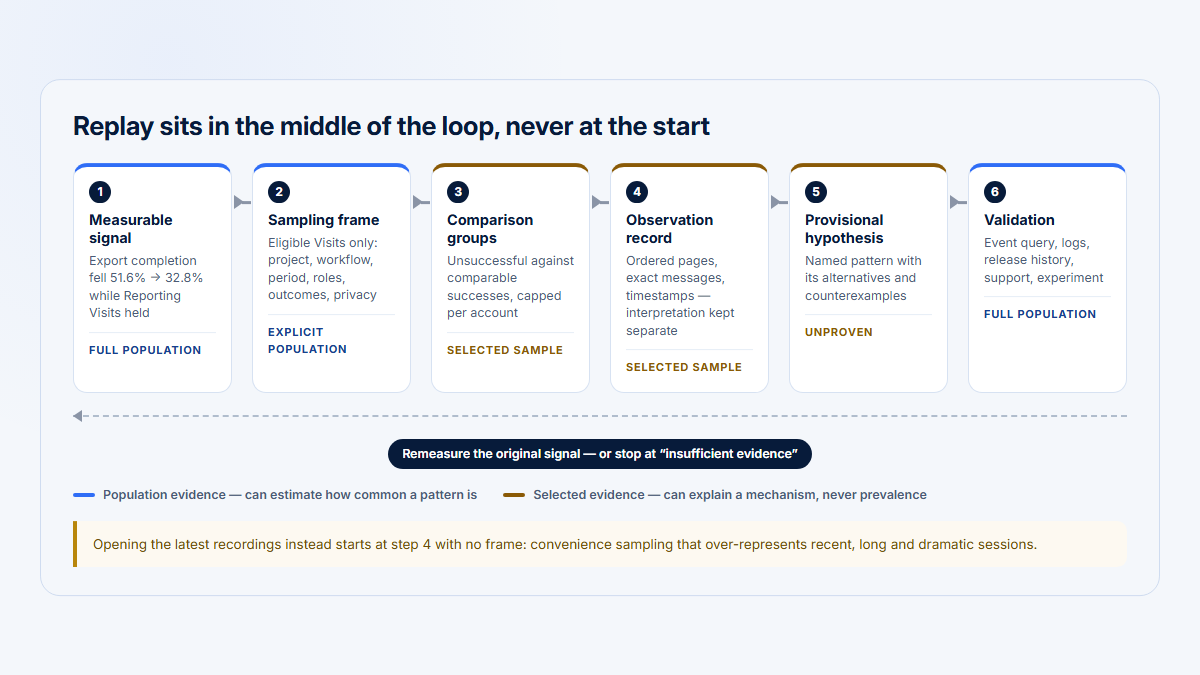
Validate the diagnosis before acting on it
1
Structured signal
An account or event measure that moved, with its period
2
Relevant replay
Sessions selected because of the signal, successes included
3
Technical evidence
Errors, requests and timing — what the recording could not show
4
Validated diagnosis
Prevalence and outcome, measured against step 1
Skipping this ships fixes for rare problems
5
Product action
Then measure again on the same signal
All three products are strongest at steps 2 and 3. Step 4 needs structured measurement, and it is the step that decides whether the work was worth doing.
Pricing and rating snapshot
Software or capacity
OpenReplay
OSS free; Dedicated from $199/month
- Displayed Dedicated configuration is $0.276/hour
- Serverless is usage-based
- Self-hosting adds infrastructure and staff cost
Captured sessions
LogRocket
Example: $176/month
- Cited calculator workload: 25,000 web + mobile sessions
- 14-day trial; no permanent free plan displayed
- Seats, retention, and add-ons change the price
Allowance or quote
Fullstory
FullstoryFree; paid plans custom
- Business, Advanced, and Enterprise packages
- Session allowance, retention, add-ons, and services matter
- Confirm exact product and mobile coverage in the quote
Project captured sessions, sample rate, retention, mobile volume, users/seats, exports, conditional recording, and support. For OpenReplay, add compute, database, object storage, monitoring, backups, upgrades, and on-call labor.
Ratings use the latest accessible April 22, 2026 G2 snapshot and were checked August 6. Rounded counts are retained because live pages were bot-blocked during verification.
Which should you choose?
- Choose OpenReplay when self-hosted control outweighs operational simplicity.
- Choose LogRocket when the daily workflow is reproducing and diagnosing frontend issues.
- Choose Fullstory when product, UX, support, and digital teams need broad experience analysis around replay.
- Pair replay with event analytics when adoption, retention, and account-level reporting must be complete and reproducible.
Run a two-week pilot with the same five workflows: a frontend exception, a slow request, an SPA route change, a masked sensitive form, and a multi-user B2B outcome. Measure capture fidelity, time to diagnosis, false signals, privacy failures, analyst usability, and projected cost. For self-hosting, include backup restore and version upgrade.
Where Hymetry fits
| Decision | Consider Hymetry | Choose the replay platforms | Hymetry limitations |
|---|---|---|---|
| Primary job | B2B account adoption and session evidence | Complete frontend debugging or digital-experience analysis | Less diagnostic and UX depth |
| Workflow | Find a Company, user, or product-area signal, then inspect Visits | Start from errors, behavioral search, or replay queues | Smaller ecosystem and fewer integrations |
| Best question | Which accounts need investigation and which session explains the signal? | What happened in this session and how should the team diagnose it? | Not a replacement for full developer tooling or experience research |
Frequently asked questions
Is OpenReplay a LogRocket alternative?
Yes when replay and developer evidence are required, especially if self-hosting matters. LogRocket remains the clearer managed choice for an established frontend-debugging workflow.
Is LogRocket better than Fullstory?
LogRocket is the stronger starting point for frontend diagnosis. Fullstory is the stronger starting point for broad product, UX, and digital-experience analysis. Neither is universally better.
Which product can be self-hosted?
OpenReplay provides the customer-operated option in this set. LogRocket documents SaaS/private-cloud offerings and Fullstory is managed; no equivalent customer-operated edition was verified for either.
Which is best for frontend debugging?
LogRocket has the clearest default recommendation. OpenReplay is competitive when deployment control matters; Fullstory provides developer tools inside a broader experience platform.
Does self-hosting guarantee privacy?
No. It changes infrastructure control. Your team still must govern collection, masking, consent, access, retention, security, export, and deletion.
Can replay replace product analytics?
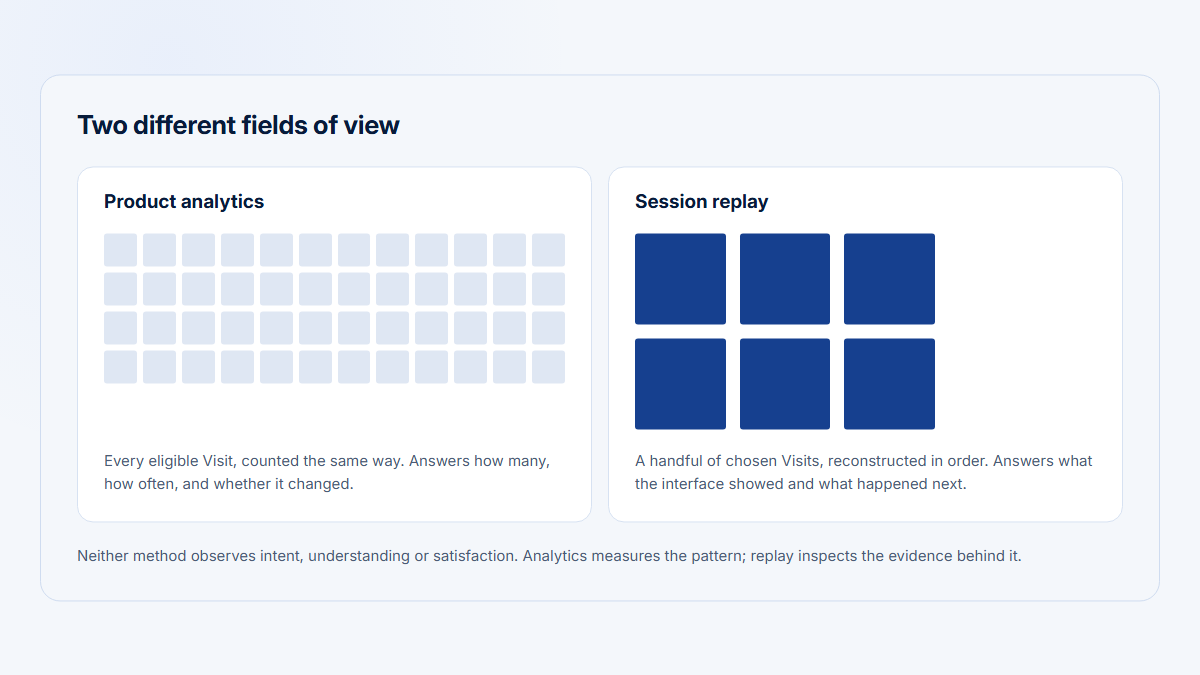
No. Replay provides sampled qualitative evidence. Use structured events and account identity for complete funnels, adoption, retention, and company-level reporting.
Sources
Official product, documentation, pricing, license, and review sources were checked August 6, 2026.
OpenReplay sources
LogRocket sources
Methodology and disclosure
The recommendation weighs buyer, developer evidence, product and UX analysis, mobile, deployment, privacy responsibility, capture reliability, and total cost. Videos retain their original vendor disclosures. Hymetry is the publisher's product; no compared vendor paid for inclusion and no affiliate links are used.
Additional preserved sources and related reading
OpenReplay sources
- OpenReplay Android SDK
- OpenReplay proxy endpoints
- OpenReplay AWS deployment
- OpenReplay deployment from source
- OpenReplay Administration and backend services
- OpenReplay iOS SDK
- OpenReplay product-analytics trends documentation
- OpenReplay React Native SDK
- OpenReplay JavaScript SDK constructor and capture options
- OpenReplay Canvas and WebGL documentation
- OpenReplay source maps troubleshooting
- OpenReplay release notes
- OpenReplay Enterprise
FullStory sources
- Fullstory StoryAI Opportunities
- Fullstory Dev Tools FAQ
- Fullstory Free plan documentation
- Fullstory Go Live
- Fullstory OmniSearch
- Fullstory Network Allowlisting
- Fullstory Console
- How Fullstory captures and reconstructs web sessions
- Fullstory network-error search
- Fullstory Audit Trails API
- Fullstory Release Notes
- Fullstory server-side user properties
- Fullstory Data Residency
LogRocket sources
- LogRocket audit logging
- LogRocket dashboards
- LogRocket Extended Session Retention
- LogRocket Issues (2026 Beta)
- LogRocket filters
- LogRocket data processing and storage location
- LogRocket role-based access
- LogRocket session troubleshooting
- LogRocket Live