What does each method answer?
Product analytics summarizes structured behavior across users, accounts, product areas, workflows, and time. Session replay reconstructs what happened inside selected visits. The practical distinction is population-level measurement versus close inspection of selected evidence.
| Dimension | Product analytics | Session replay |
|---|---|---|
| Primary question | How many, how often, which accounts, what changed, and compared with what? | What sequence and interface state appeared in this visit? |
| Unit | Events, users, accounts, features, cohorts, sessions, and periods | One deliberately selected visit or comparison sample |
| Strength | Frequency, prevalence, segmentation, trends, adoption, and funnels | Navigation, visible UI state, timing, errors, and local context |
| Limitation | Depends on definitions and instrumentation; usually cannot show the rendered interface | Cannot establish prevalence or representativeness from a few sessions |
| Suitable output | A trend, account list, cohort, funnel, or relevant session IDs | An observation, bug trace, comparison pattern, or hypothesis |
| Common misuse | Treating correlation or a funnel change as proof of cause | Treating a dramatic replay as representative or assigning intent |
A decline in export completion can identify the affected population. Replay can then show whether selected users saw a hidden control, unexpected state, or repeated error. Return to analytics to determine how common the observed pattern is.
Two different fields of view
Product analytics
Every eligible Visit, counted the same way. Answers how many, how often, and whether it changed.
Session replay
A handful of chosen Visits, reconstructed in order. Answers what the interface showed and what happened next.
Neither method observes intent, understanding or satisfaction. Analytics measures the pattern; replay inspects the evidence behind it.
Browser replay is commonly reconstructed from a serialized page state, later DOM mutations, interactions, and timestamps rather than stored as literal screen video. Assets, canvas, iframes, fonts, masking, and capture configuration can affect fidelity.
For related definitions, see B2B product analytics and page views, Visits, sessions, and engaged time.
Product analytics measures the population
Structured events can compare completion by account, role, plan, onboarding stage, release, and equivalent period. They can also identify which companies and visits contribute to the difference.
The abstraction is the limitation. A funnel can show that fewer users moved from export setup to completion without showing the rendered control, unexpected page state, or uninstrumented step around the change.
Replay inspects selected visits
Replay can show navigation, reconstructed viewport state, visible errors, timing, and the sequence around a known outcome. It is strongest when a metric, support case, or research question supplies the selection rule.
A replay library without selection logic is a collection of anecdotes. Watching several sessions does not establish prevalence unless the team returns to a defined denominator.
Replay is reconstructed evidence
- DOM snapshots and mutations may reconstruct the document state.
- Clicks, scrolling, pointer movement, viewport changes, and inputs depend on capture settings.
- Canvas, media, iframes, shadow DOM, fonts, and remote assets may be incomplete.
- Masking, blocking, sampling, and recording start time can remove context.
Review the actual recorder and player behavior before treating a replay as a faithful copy. Native mobile replay can use different capture methods from browser reconstruction.
What can neither method prove alone?
| Observed evidence | Responsible conclusion | Unsupported conclusion |
|---|---|---|
| A long pause | The visit contained a pause in this visible state. | The user was confused. |
| Repeated clicks | The control received repeated interaction. | The user was frustrated. |
| A missing completion event | The event did not appear in the measured sequence. | The user abandoned because of the interface. |
| One failed replay | This selected visit contained a failure. | Most customers have the same problem. |
| Declining product usage | Observed behavior changed for the defined population. | The account intends to churn. |
When motivation matters, add interviews, usability research, support conversations, surveys, or another source that lets users explain their experience.
- Analytics may miss a behavior because instrumentation is incomplete.
- Replay may omit content because capture, masking, or reconstruction differs from the original page.
- Both sources can contain identity, event, or timing errors.
- Neither method observes customer budget, procurement, leadership, or renewal intent.
Why does B2B account context change session selection?
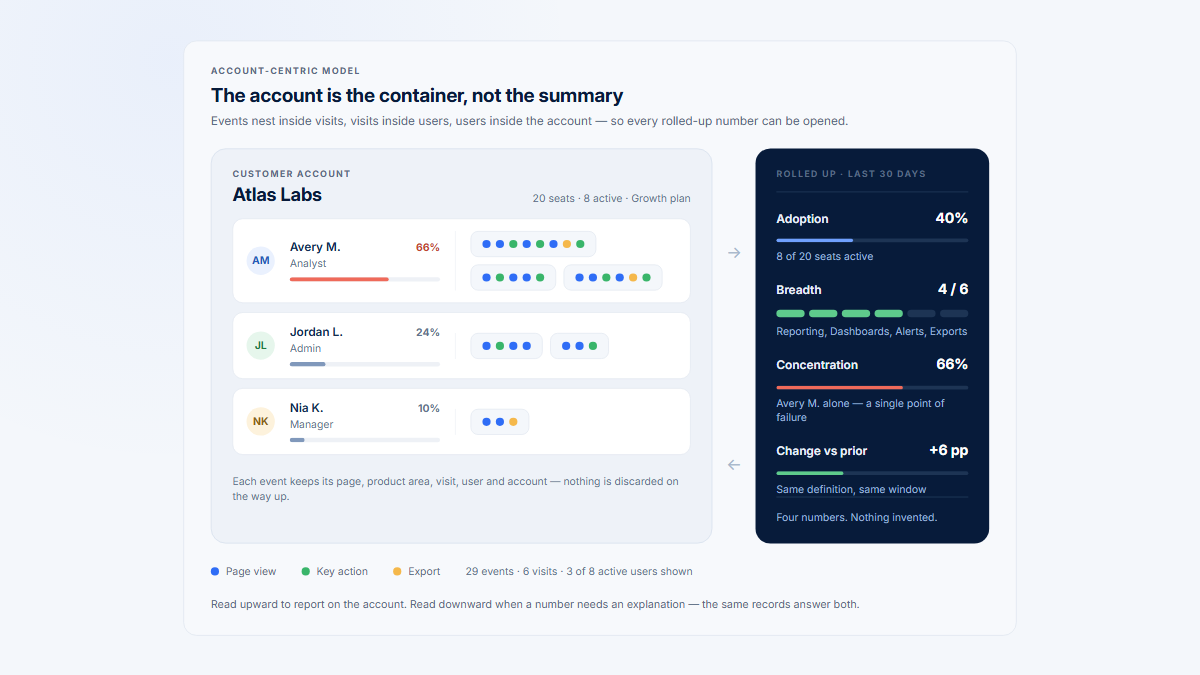
A replay from one person can be accurate for that user and still misrepresent the customer account. One expert administrator may generate healthy-looking Reporting sessions while twenty contributors never complete an export.
- Account: select sessions from the customer or workspace contributing to the measured change.
- Role: administrators, champions, contributors, and viewers may see different controls.
- Eligibility: confirm plan access, permissions, prerequisites, and lifecycle.
- Product area: require the relevant grouped page or workflow in the selected visit.
- Distribution: distinguish broad use from one-person concentration.
- Comparison: match first-time users with suitable first-time successes, not only experienced experts.
These checks prevent expected behavior in an ineligible account or novice role from being labeled a product defect. See product usage by company for the broader account model.
Account context also changes severity. A problem affecting one administrator-owned setup path may have a different portfolio impact from the same problem blocking contributors across many customer accounts.
Account totals can also hide concentration. Efficient sessions from one champion do not prove that a collaborative workflow has spread to the rest of the customer team.
How do you move from signal to session evidence?
- State the decision. Define what the investigation should change.
- Define the signal. Record the behavior, population, denominator, period, and comparison.
- Find affected accounts and users. Check segment, lifecycle, role, and concentration.
- Select relevant visits. Require the workflow, release, outcome, and time period under review.
- Add a comparison group. Compare success with failure, novice with experienced, or before with after.
- Record observations and form a testable hypothesis. Keep inference separate from captured behavior.
- Validate, change, and remeasure. Return to broader analytics or direct research before a consequential decision.
From signal to evidence, and back again
1
State the decision
2
Define the signal
3
Find affected accounts
4
Select relevant Visits
5
Add a comparison group
6
Form a testable hypothesis
7
Validate and remeasure
Whole population
Selected Visits
Write the selection rule down. Reviewing the newest or most dramatic recordings is an anecdotal sample and cannot support a prevalence claim.
Document the selection rule. Reviewing the newest or most dramatic recordings creates an anecdotal sample that cannot support prevalence claims.
Build a small but deliberate sample
Include several accounts and relevant roles, not many recordings from one customer. Review both outcomes and stop when additional sessions no longer add materially different patterns.
- Successful versus unsuccessful completion
- New versus experienced users
- Before versus after a release
- Broadly adopted versus champion-dependent accounts
Record observations in a consistent format: account and role context, page state, sequence, timing, visible error, outcome, and interpretation confidence.
Use a sampling frame before choosing recordings. Define the eligible population, outcome, release, account cohort, role, and period, then select several cases from each comparison group.
What does a Reporting investigation look like?
This fictional example begins with a defined account-level change rather than an open replay library.
| Stage | Evidence | Next step |
|---|---|---|
| Signal | Reporting Visits remain stable, but eligible companies completing export decline. | Verify event and denominator definitions. |
| Account segment | The decline is concentrated in onboarding accounts after a release. | Identify affected roles and viewport conditions. |
| Session sample | Select successful and unsuccessful export Visits from comparable onboarding users. | Record visible differences without assigning intent. |
| Observation | Several failures return from export settings to report setup before completion. | Form a narrow interface hypothesis. |
| Validation | Test the pattern across the full affected population and release versions. | Prioritize only if prevalence and severity justify it. |
Illustrative: stable traffic hiding an account-level decline
Reporting Visits
Stable
Companies completing export
Declining
Each pair shows the previous period, then the current one. The volume metric would have closed the investigation; the completion metric opens it.
Account segment
Concentrated in onboarding accounts after one release
Session sample
Successful and unsuccessful exports from comparable onboarding users
Observation
Several failures return from export settings to report setup before completing
Validation
Test the pattern across the full affected population and release versions
The replay evidence suggests a mechanism worth testing. It does not prove motivation, and it does not establish how widespread the pattern is.
The replay evidence may explain a mechanism worth testing. It does not prove user motivation or establish how widespread the pattern is until the team validates it.
- State the captured observation.
- Identify the comparison where the observation differs.
- Write a hypothesis that can be falsified.
- Define the broader event or research evidence needed to test it.
A testable hypothesis might be: “After the release, first-time contributors on smaller viewports are less likely to see the primary export action before returning to setup.” This can be checked across viewport, role, release, and completion data.
If the pattern appears in replay but not in the broader event data, investigate whether the sample is unusual or instrumentation misses the relevant state. If analytics shows a decline but selected sessions do not, revise the sampling rule or hypothesis.
How do you avoid misleading or unsafe replay evidence?
| Risk | Safeguard |
|---|---|
| Random or dramatic-session bias | Use a documented signal, segment, outcome, and comparison rule. |
| Severity confused with frequency | Record both, then measure prevalence across the relevant denominator. |
| Only failed sessions reviewed | Include comparable successes to identify meaningful differences. |
| Capture of sensitive content | Minimize, mask, block, and exclude before storage where possible. |
| Broad employee access | Apply least privilege, purpose limits, access logging, and review. |
| Unlimited storage | Set purpose-based retention and deletion for recordings and exports. |
| Masking rules drift after UI changes | Test production-like content before launch and after material releases. |
Privacy, notice, consent, lawful basis, employee monitoring, and contractual requirements vary by jurisdiction and context. Obtain qualified legal advice for the actual implementation.
Hymetry’s Privacy Controls describe configurable filtering and exclusions. Self-hosting does not remove responsibility for capture scope, access, retention, or verification.
Control the complete data lifecycle
Masking is not a guarantee. Selector rules can break after interface changes, and URLs, console data, network metadata, event properties, or text outside expected fields can still carry sensitive information.
- Define the investigation purpose before capture.
- Exclude sensitive routes and content before storage where technically possible.
- Restrict replay access to people with a documented need.
- Audit access and delete recordings after the purpose-based retention period.
Event analytics also requires privacy controls. Event names, properties, URLs, identifiers, and payloads can contain personal or sensitive data. Use data minimization for both methods rather than treating replay as the only privacy surface.
Document who can record, search, view, export, and delete session evidence. Test the stored replay rather than relying only on configuration, because the stored result is what reviewers will access.
When should you use product analytics, replay, or both?
| Question | Start with | Why |
|---|---|---|
| How many, which accounts, what changed, or where in the funnel? | Product analytics | The question needs a population, denominator, period, or comparison. |
| What appeared on screen or preceded a known failure? | Session replay | The question concerns a specific visit or selected sample. |
| What could explain this measured pattern, and how common is it? | Both | Analytics sizes the signal; replay supports a hypothesis; analytics validates it. |
| What did the user think, or do they intend to churn? | Neither alone | Add direct research, support, survey, or customer context. |
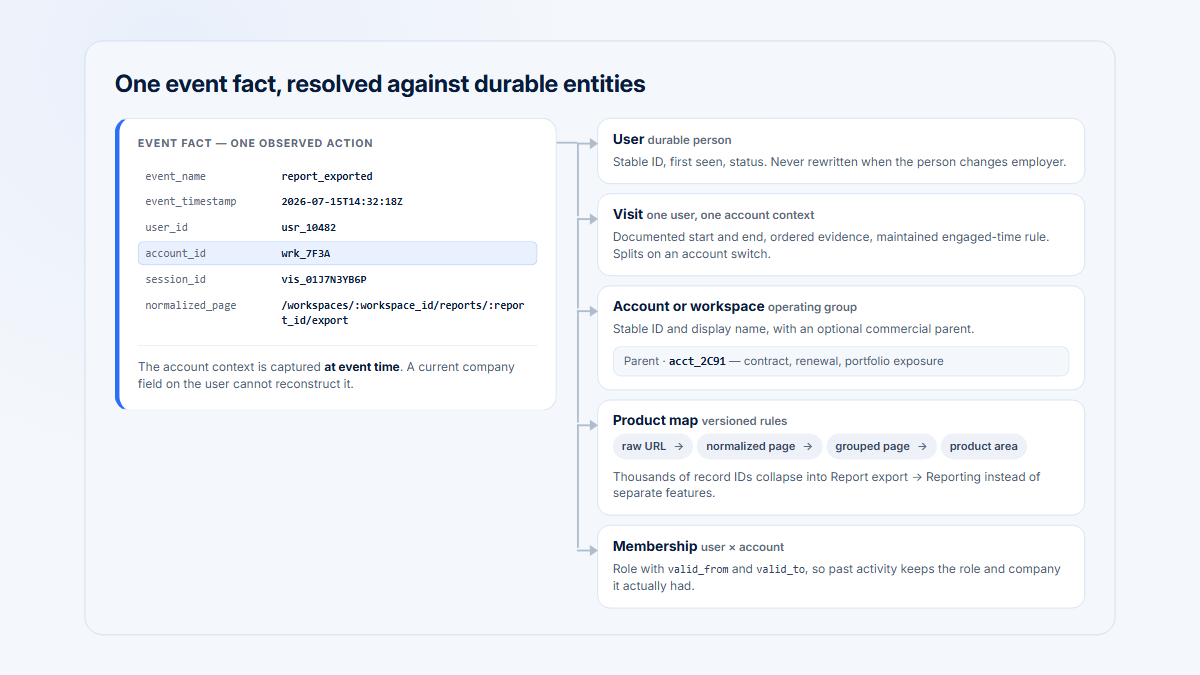
Hymetry connects Pages, Companies, Users, and Visits so teams can move from a measured account or product signal to selected evidence. The replay remains evidence for review, not a causal verdict.
Common mistakes
- Browsing random sessions without a question
- Treating one severe replay as representative
- Reviewing failures without comparable successes
- Using replay instead of measuring frequency
- Using analytics without checking interface evidence when it matters
- Assigning intent to pauses, repeated clicks, or abandonment
- Changing the product after one anecdotal session
The strongest workflow is cyclical: analytics locates and sizes the pattern, replay and research refine a hypothesis, and analytics measures the effect of the resulting change.
Choose the starting point from the uncertainty
When a known support case identifies a specific user and time, replay may be the practical starting point. When the uncertainty concerns adoption, trend, or prioritization, begin with analytics and use the resulting segment to select evidence.
Preserve the original population, event, denominator, and comparison after a product change. If the measurement changes with the interface, the team loses the baseline needed to judge whether the intervention worked.
- Remeasure the population-level outcome.
- Check whether the affected-account distribution changed.
- Review new comparison sessions only when the result still needs explanation.
Frequently asked questions
Is session replay qualitative or quantitative?
Watching selected replays is usually qualitative observational analysis. Replay metadata can be aggregated, but prevalence still requires a defined population and denominator.
Is browser replay the same as screen recording?
Not necessarily. Browser replay is commonly reconstructed from serialized page state, mutations, interactions, and timing data. Implementations and native mobile capture methods differ.
When should a product team use session replay?
Use it when a support case or measurable product signal identifies relevant visits and the team needs sequence or visible interface context.
How many replays should a team review?
There is no universal number. Include several relevant accounts, roles, outcomes, and comparison sessions, then validate any pattern quantitatively.
Can replay explain why a user abandoned?
It can show captured behavior before abandonment and support a hypothesis. It cannot reveal the user’s thoughts or prove motivation.
Sources
Methodology and disclosures
Official standards, open-source replay documentation, vendor implementation documentation, and privacy guidance were prioritized. Product behavior was not hands-on tested for this guide. Session replay capabilities and privacy controls vary by implementation.
Source directory
Browser replay and standards
- rrweb source repository
- rrweb guide
- rrweb session replay glossary
- WHATWG DOM Standard: MutationObserver
- MDN: MutationObserver
- Mixpanel: Session Replay
- Mixpanel: Session Replay privacy controls
- PostHog: Session replay privacy controls
Product analytics and account data
Privacy and security
- NIST Privacy Framework
- UK ICO: Data minimisation
- UK ICO: Storage limitation
- UK ICO: Data protection by design and default
- OWASP Authorization Cheat Sheet
- OWASP Logging Cheat Sheet
- Acar, Englehardt, and Narayanan: No boundaries