Understand the three recording models
| Model | Stored representation | Strength | Main limitation |
|---|---|---|---|
| DOM and event reconstruction | Initial document representation plus timestamped mutations and interactions | Structured elements, selectors, text, targeted masking, often efficient | Player reconstructs; missing/changed data can diverge from the original |
| Image or frame capture | Screenshots, image frames, or encoded display stream | Preserves captured pixels, including some difficult visual surfaces | Less structurally searchable; frame rate, storage, and visual privacy trade-offs |
| Hybrid | DOM/events plus selected frames, canvas, network, console, errors, or performance | Combines structural, visual, and diagnostic evidence | Largest complexity, privacy surface, bandwidth, and failure surface |
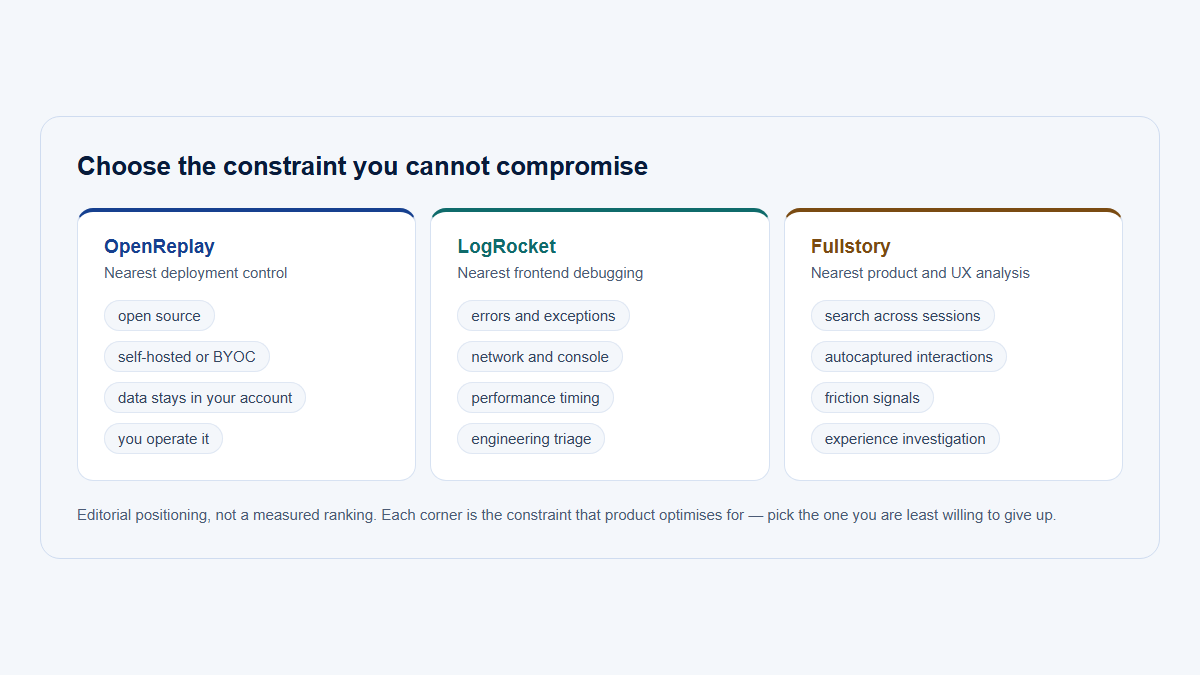
No model is universally best. Choose from the product surfaces, question, privacy constraints, required diagnostic depth, and operating cost. Do not call a hybrid product “more complete” without naming which layers are enabled and what each omits.
Three ways to store a session
DOM and events
A document representation plus timestamped mutations and interactions. Searchable and maskable element by element.
The player reconstructs the page, so missing or changed data can diverge from the original.
Image frames
Screenshots or an encoded display stream. Preserves the pixels that were captured, including difficult visual surfaces.
Not structurally searchable; frame rate, storage and visual privacy all trade off.
Hybrid
DOM and events plus selected frames, canvas, network, console or performance layers.
Largest complexity, privacy surface, bandwidth and failure surface.
No model is universally best. A hybrid product is not “more complete” until you name which layers are enabled and what each one omits.
How DOM reconstruction works
- Recorder starts: project, Visit, time, viewport, URL policy, and configuration are established.
- Initial snapshot: the accessible document structure, text/attributes/styles, and approved state are serialized after masking/blocking rules.
- Mutations: a
MutationObserveror equivalent captures selected nodes appearing, disappearing, moving, or changing. - Interactions: clicks, pointer/touch samples, scroll, input changes, viewport changes, focus/visibility, routes, and custom events may be recorded.
- Timestamping and batching: records are ordered, compressed, and delivered in chunks; page-close delivery can be incomplete.
- Storage and indexing: payloads plus safe User, Company, Visit, route, and quality metadata are retained according to policy.
- Player: a sandbox reconstructs the initial tree, applies later records in order, and advances through captured time.
rrweb is one concrete open-source implementation of this pattern, not a universal definition of every replay product. Its design separates serialization, incremental observers, sandboxing, and playback. Plugins can add canvas or console behavior, expanding both evidence and risk.
Snapshot once, then record what changed
1
Initial snapshot
The accessible document is serialized after masking and blocking rules apply
2
Mutations and interactions
Nodes appearing, moving or changing; clicks, scroll, input, routes, viewport
3
Timestamp and batch
Ordered, compressed and delivered in chunks
Delivery at page close can be incomplete
4
Store and index
Payloads plus safe User, Company, Visit, route and quality metadata
5
Player
A sandbox rebuilds the initial tree, then applies later records in order
rrweb is one concrete implementation of this pattern, not a definition every product follows. What you watch is a reconstruction, not a recording of the screen.
What replay may capture
Actual content depends on recorder, options, browser, page architecture, privacy configuration, and installed diagnostics. “Common” is not “guaranteed.”
| Category | Typical status | Useful evidence | Important limit or risk |
|---|---|---|---|
| Initial DOM and mutations | Common in DOM replay | Visible structure and state changes | Blocked/inaccessible nodes and missing early state can break reconstruction |
| Text and attributes | Often, unless transformed | Labels, validation, element state | Names, IDs, tokens, account data, and temporary messages may be sensitive |
| Input changes | Configuration-dependent | Corrections, selections, workflow progression | High-risk; password defaults do not cover ordinary sensitive fields |
| Clicks, pointer, touch, scroll | Common, often sampled/throttled | Interaction sequence and visible region | Does not prove gaze, reading, expectation, or emotion |
| Viewport, resize, focus, visibility | Common or optional metadata | Responsive layout and background-tab context | Visibility/focus is not attention; combined metadata can increase identifiability |
| Routes and history changes | Usually instrumented | SPA navigation and page context | URLs can contain identifiers, queries, filenames, and tokens |
| Styles and assets | Referenced, copied, or transformed | Layout and appearance | Assets can move, expire, require authorization, or change later |
| User, Company, custom events | Integration-defined | B2B actor/account and business workflow context | Stale membership, account switching, impersonation, and unsafe properties can misattribute or expose data |
| Console and errors | Optional/plugin/vendor-specific | Warnings, stack traces, frontend failures | Logs can contain objects, credentials, paths, and customer data |
| Network and GraphQL | Optional/vendor-specific | URL/method/status/duration and selected failures | Headers, bodies, variables, and results are a major privacy surface |
| Performance | Optional | Resource, navigation, rendering, and long-task context | Timing does not automatically identify the visible cause |
| Canvas/screenshots/media state | Explicit specialized capture | Otherwise difficult visual output | Storage, compatibility, and visual privacy grow substantially |
Inspect emitted browser requests and stored payloads. A configuration screen saying “mask text” does not prove values are absent from DOM attributes, URLs, metadata, console logs, network bodies, canvas frames, search indexes, or exports.
Four tiers, from commonly captured to never observable
Commonly captured
Optional, off by default
Outside a page recorder
Never observable
A settings screen saying “mask text” does not prove values are absent from attributes, URLs, metadata, console logs, network bodies, canvas frames, search indexes or exports. Inspect the payload that actually leaves the browser.
Know what replay cannot reveal and where capture breaks
Replay normally does not reveal the user's thoughts, motivation, satisfaction, expectation, gaze, attention, off-screen conversation, complete device environment, complete backend truth, or population prevalence. It cannot prove that a person was confused or that a pattern caused an outcome.
Difficult browser surfaces need explicit testing:
- Canvas: DOM observation sees the canvas element, not drawing pixels. Some recorders capture commands or frames; cross-origin assets can taint export paths.
- WebGL: complex GPU state and resources require specialized capture; ordinary DOM replay is insufficient.
- Video/audio: playback state may be captured, but media content, DRM, controls, and timing can differ.
- Cross-origin iframes: the same-origin policy usually prevents parent-page access; coordinated instrumentation is required.
- Same-origin iframes: potentially recordable, but lifecycle and nested-document support vary.
- Shadow DOM: open roots may be supported; closed roots and component implementation vary.
- Rich-text editors and third-party widgets: custom DOM, iframes, canvas, or internal state can be incomplete.
- Native browser controls: select menus, file pickers, permission dialogs, autofill, and browser chrome are not ordinary page DOM.
- CSS animations, fonts, and assets: changed timing, unavailable files, authentication, or later versions can alter playback.
A replay is also bounded by its start and end. It may begin after page initialization, miss batches on abrupt close, or omit activity outside the instrumented surface. Quality flags should identify missing snapshot, sequence gap, incomplete finalization, or incompatible version.
Handle SPAs, account switching, tabs, and fidelity
Single-page applications change route and state without a full reload. Instrument history/navigation and maintain a normalized Page model; DOM mutations alone do not create analytical page views. Record modal, drawer, tab, and workflow state explicitly when it matters.
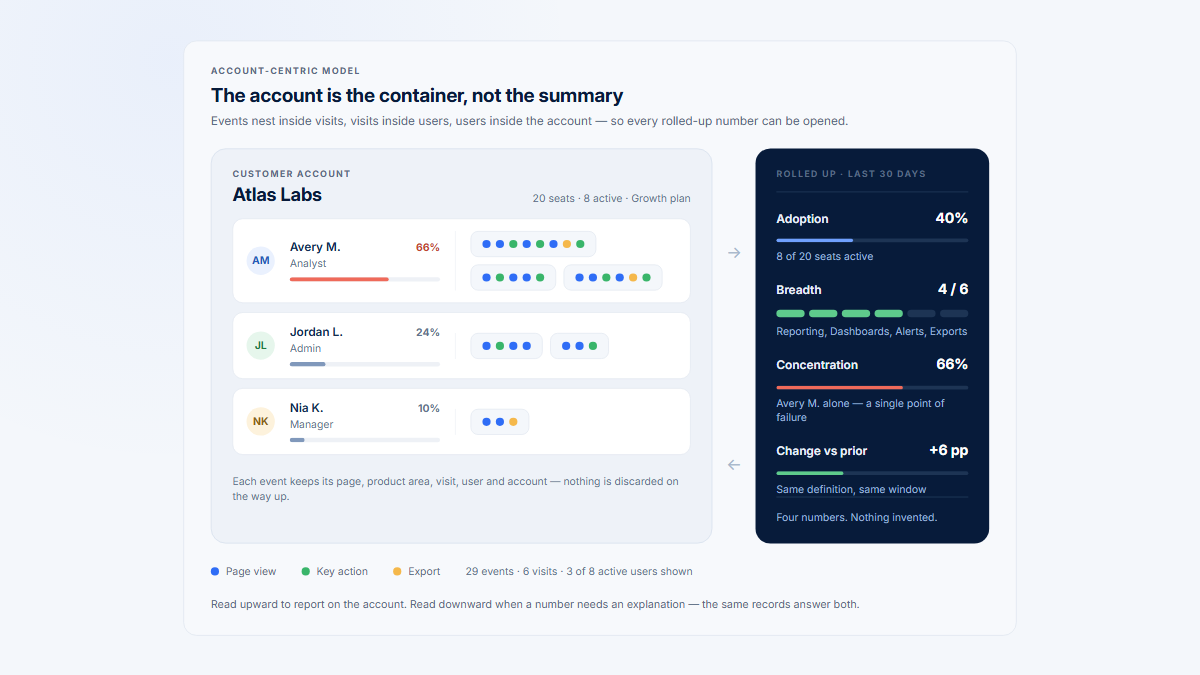
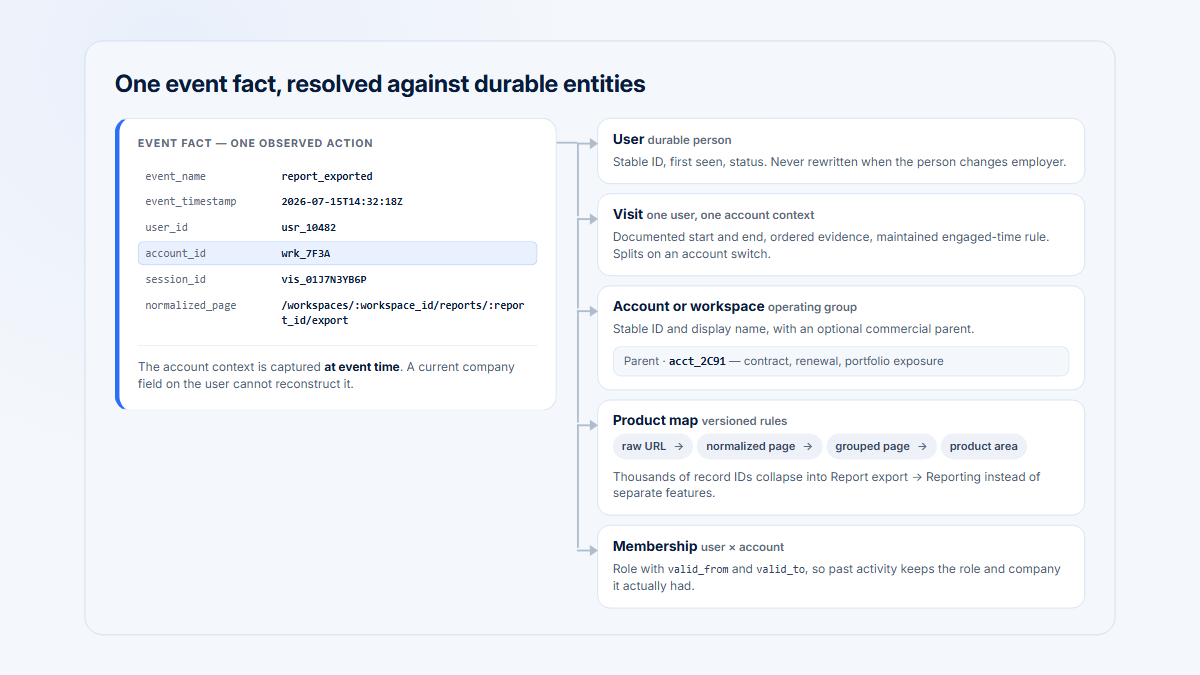
B2B applications must track active Company/workspace context over time. A person can switch accounts during one browser session. Preserve when the switch occurred so later events and replay search are attributed correctly, and distinguish support impersonation from customer activity.
Treat tabs as separate contexts
Each tab or window generally has its own recorder context. A replay may show the page losing visibility or focus but not what happened in another tab, a native application, an email, or a spreadsheet. Shared Visit IDs across tabs can create ordering ambiguity unless the implementation models them explicitly.
Playback can diverge because events were lost or sampled, the initial snapshot was late, assets changed, unsupported elements were skipped, timing/order differed, the recorder/player version changed, or privacy controls removed content. Reconstruction fidelity must be treated as evidence quality, not assumed perfection.
Interpret masking, diagnostics, and timing correctly
Masking transforms content; blocking omits an element/subtree; exclusion stops or prevents recording. Each changes what evidence remains. A masked input can show that typing occurred, but length/timing may still leak limited information and the same value may appear elsewhere. Test dynamic copies, validation messages, attributes, URLs, filenames, and temporary states.
Optional console, network, error, performance, and custom-event data must have independent privacy filters and retention. Visual masking does not redact them. Prefer allowlisted fields and safe categories over raw headers or bodies.
Interpret replay time carefully
Replay time is reconstructed event time, not necessarily engaged time. Long gaps can mean reading, waiting, background tabs, idle devices, off-screen work, or missing events. Page Visibility and focus can improve context but cannot prove attention. For measured engagement, define activity rules separately and label the metric.
Screen recording and DOM replay should not be conflated. A screen-capture stream records selected pixels and may include browser/system surfaces with user permission. DOM replay records instrumented page structure/events and reconstructs them later. The privacy, fidelity, storage, and access boundaries differ.
Illustrative B2B example: two workspaces
Fictional example: an administrator configures an integration in Workspace A, opens documentation in another tab, switches to Workspace B, returns, changes credentials, tests the connection, and encounters a visible error before later success.
| Replay may show | Replay does not establish | Additional evidence |
|---|---|---|
| Workspace switch event and normalized routes | Why the administrator switched | Account/workspace membership and interview context |
| Repeated credential-field edits, if safely represented | Whether the credential was forgotten or unavailable | Support research; do not capture the secret |
| Visible error state and later successful state | The backend root cause | Structured error category and server logs |
| Page lost visibility while documentation was opened elsewhere | What happened in the other tab or whether it was read | None unless separately and lawfully instrumented |
| Successful connection-test event | Long-term business value or satisfaction | Recurring sync data and customer-confirmed outcome |
An evidence-based finding is: “In this Visit, the administrator switched workspaces, returned to Integration setup, received a visible authentication error, changed the credential field, and later completed a connection test.” An unsupported finding is: “The user was confused by credentials.”
To estimate prevalence, query structured connection-test failures across the eligible population. To diagnose backend cause, inspect approved logs. To understand expectation, use research. Replay is one layer in a chain of evidence.
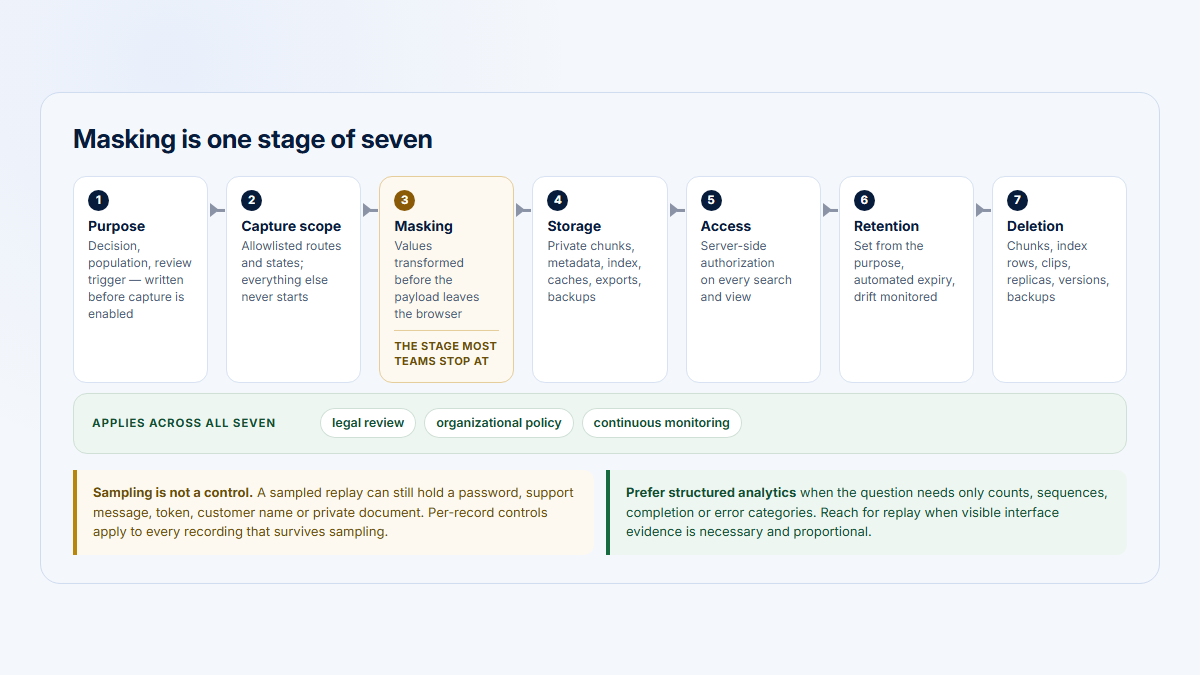
Use replay responsibly with account context
- Verify the recorder, enabled options, versions, and emitted data.
- Check masking, blocking, exclusion, URLs, identity, and optional diagnostics.
- Confirm Company, workspace, User, role, impersonation, and Visit context.
- Review structured route and meaningful-event data.
- Write exact observations with timestamps.
- Separate interpretations and alternatives.
- Name missing browser, backend, qualitative, or population evidence.
- Compare successful and unsuccessful Visits.
- Validate prevalence quantitatively and causes with the right method.
- Document fidelity and privacy limitations in the finding.
Hymetry connects Visits to normalized Pages, Companies, and Users so reviewers can start from a product signal and open selected session evidence. The connection supplies B2B context; it does not make a replay complete, representative, or a window into intent.
Frequently asked questions
Is session replay a video?
Often no. DOM-based replay stores structured snapshots and events, then reconstructs them. Some products use images, frames, or hybrid layers.
What does DOM-based replay record?
Typically an initial serialized document plus selected mutations, interactions, viewport/route state, and configured metadata after privacy transformations.
Does replay record passwords?
Responsible defaults commonly mask password fields, but teams must test actual payloads and exclude other sensitive fields, copies, logs, URLs, canvas, and temporary states.
Can replay capture another browser tab?
Not usually from the current page recorder. It may record visibility/focus changes, but another tab or application needs separate instrumentation.
Does replay capture network requests and console errors?
Only when an optional product/plugin layer is enabled. They are not inherent to visual/DOM replay and require separate privacy controls.
Why can playback differ from the original?
Missing events, changed assets, unsupported elements, timing/order, version incompatibility, and intentional masking/blocking can change reconstruction.
Can replay prove a user was confused?
No. It shows captured behavior and interface state. Intent or emotion is an interpretation needing qualitative evidence.
Is self-hosted replay automatically more private?
No. Collection scope, filtering, access, security, retention, deletion, backups, and operational practice determine privacy outcomes.