
User analytics

See who is engaged, slipping, or gaining momentum.

Users turns individual product behavior into clear health, adoption, and next-action signals. See who is active, passive, dropped, at risk, or becoming a champion before the account-level signal hides the person behind it.

Explore a sample SaaS project. No credit card required.

Maya Chen

UrbanPulse · Account health 82 · Project lead

72
HealthMomentum
Trend+24%
Active days9
Pages used14
Engagement

Engaged time rose to 23 minutes and activity is spread across core workflow pages.

Company context

One of three active users inside an account with a healthy renewal profile.

Next action

Ask for workflow context
User health overview

See every user’s health in one place.

Start with a simple model before opening the details. Hymetry separates active users from light, passive, dropped, at-risk, and gaining-momentum users so teams can understand health without scanning every metric.

Health distribution

Last 30 days · 3,166 users across 84 companies

Review daily
Active

Consistent usage with meaningful engaged time.

28%
Light

Recent activity, but shallow or narrow usage.

18%
Passive

Low return frequency or low session depth.

16%
Dropped

Previously active users whose usage stopped.

12%
At risk

Declining engagement compared with normal behavior.

10%
Gaining momentum

Growing usage that may indicate a champion.

16%

Flagship users table

Know who is active, passive, dropped, or at risk.

The Users table keeps the main user-level signals together: company context, health, activity trend, active days, engaged time, adopted pages, last seen, and the next action worth taking.

UserCompanyHealthTrendActive daysEngagedPages usedLast seenRecommended action
Maya ChenUrbanPulseMomentum+24%923m14TodayAsk for workflow context
Jon BellCloudForgeAt risk-31%24m36 days agoCheck recent sessions
Elena RamosNorthStar SystemsActive+8%1131m18TodayInvite as backup champion
Priya ShahEdgewater LabsPassive-12%12m29 days agoReview onboarding activity
Marcus LeeWokka IndustriesLight0%48m5YesterdayIntroduce unused workflow
Sarah AllenCloudForgeDropped-58%00m021 days agoReach out before renewal
ActiveDaily core usage
LightFewer active days
PassiveShort sessions only
At riskNo recent visits
  • Active days dropped from nine to two compared with the user’s normal pattern.
  • Engaged time fell below the account peer baseline.
  • Core page usage softened while admin page visits increased.
  • The user has not returned since the failed setup session.

Explain movement

Understand why a user changed.

A health label only helps when teams can see what moved. Hymetry connects a user’s state change to active days, engaged time, product areas, page adoption, visit history, and peer context.

Evidence view

Open one user and inspect the evidence.

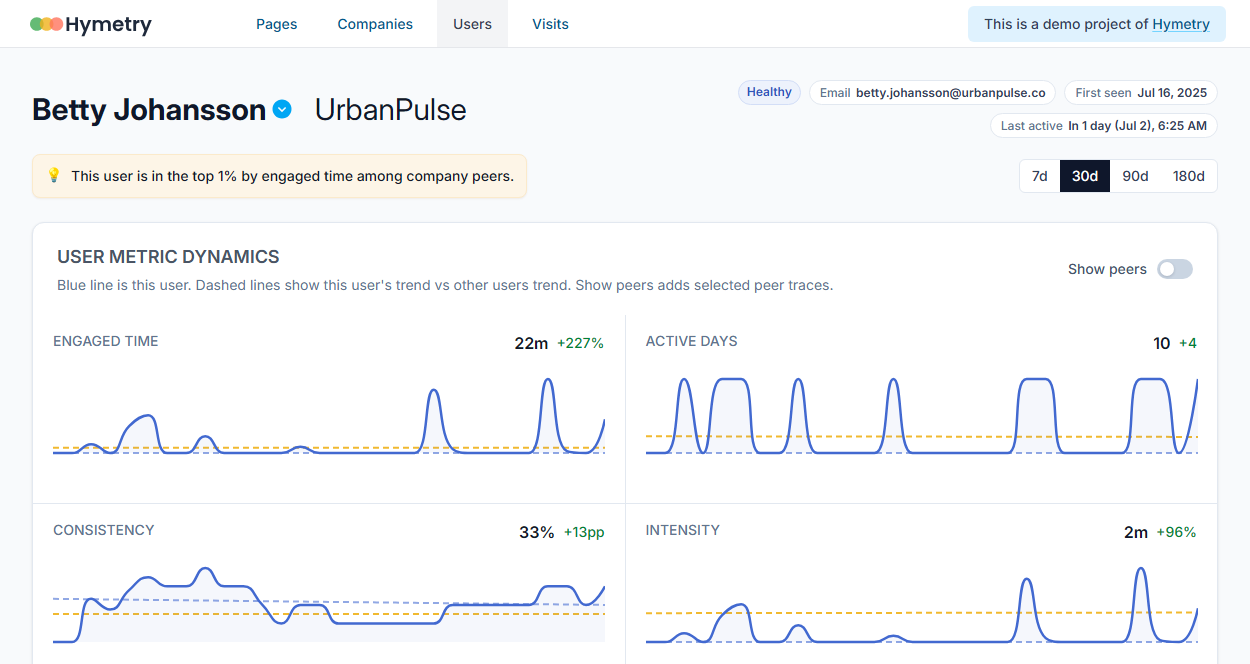
The detail view keeps the user profile, company context, product-area adoption, visits, activity timeline, and recommendations in one investigation path.

User

Health, trend, active days, engaged time, pages used, visits, and last seen.

Company

Account health, peer behavior, renewal context, and backup champion gaps.

Pages

Which workflows the user adopted, ignored, or stopped using.

Visits

The raw sessions behind a label, recommendation, or unusual movement.

User detail view showing profile, engagement trend, product-area usage, peer comparison, pages used, and recommendations
Use the detail view when an individual user signal needs context before a team acts.

Segments and roles

Compare users by role, company, and lifecycle stage.

Keep segments compact and practical. Teams can compare users by the dimensions that explain behavior without turning the page into a wall of cohort charts.

Role

Admin, champion, manager, contributor, viewer, or unknown.

Company

Account health, lifecycle, plan, and peer baseline.

Health state

Active, light, passive, dropped, at risk, or gaining momentum.

Product area

Core workspace, projects, reporting, settings, integrations, and missing workflows.

Lifecycle

New, onboarding, active, slipping, reactivated, or expansion candidate.

Peer baseline Champions Onboarding Risk queue

Prioritize people

Find champions before they disappear.

Users is not just a directory. It highlights people who need attention, represent expansion opportunities, or can explain the workflow while momentum is fresh.

Jon BellCloudForge
At risk

Engaged time fell 31%, no setup completion visit, and last active moment was six days ago.

Inspect recent sessions

Elena RamosNorthStar Systems
Champion

Broad page adoption, daily core usage, and top peer rank inside the account.

Invite as backup champion

Maya ChenUrbanPulse
Momentum

Active days, visits, and project workflow usage all increased this week.

Ask for workflow context

Sarah AllenCloudForge
Dropped

Previously active user has no visits in 21 days and the company is entering renewal review.

Reach out before renewal

Pages and product usage

Connect user behavior to pages and product areas.

When a user changes, teams need to know what they adopted. Hymetry shows whether usage is broad or concentrated, which pages are missing, and how a user compares with peers.

Maya Chen usage mix

Compared with UrbanPulse peers · Last 30 days

14 pages used
Project board
High adoption
Dashboard
Core habit
Reporting
Gap
Integrations
Unused
Peer context

Project board usage is above peer median, but Reporting adoption trails similar active users.

Suggested follow-up

Introduce the reporting workflow after confirming why current usage is project-heavy.

Recent visit evidence

Jon Bell · CloudForge · At-risk signal

Review session

Session path

Dashboard Settings Billing Setup Exit
Cluster

Three short visits around setup pages, then no return activity.

Replay context

Session replay is available for the failed setup flow.

Last active

Six days ago after opening setup and leaving without completion.

Visits and sessions

Open the visits behind every user signal.

Visit-level evidence stays separate from the user table. It helps teams verify what happened when a signal needs proof: page path, replay context, activity clusters, and the last active moment.

Recommendations

Turn user signals into next actions.

Recommendations stay grounded in visible evidence. Teams can see the signal, review the source views, and decide what to do next.

Featured recommendation

CloudForge · Medium priority · Customer success owner

Check dropped users
Signal

Several users who were active last month have no recent visits.

Open users
Evidence

Engaged time declined, setup sessions are incomplete, and the account relies on one champion.

Review detail
Next action

Reach out to passive champions and add a backup champion before renewal review.

Inspect visits

Guardrails and handoff

Every recommendation stays reviewable.

User recommendations stay connected to company context, page usage, visit history, peer comparison, and the source views behind the action.

Separate signal levels

User health, company context, page adoption, and visit evidence stay distinct until the detail view connects them.

Source views stay visible

Teams can open the table, detail view, product usage, or visits behind each recommendation.

Teams decide the action

Hymetry suggests the next review step; product, success, and account teams choose the follow-up.

The workflow stays focused: user health, behavior, evidence, priority, and action.

Connected product areas

See who is really using your product.

Explore a demo project first, then create your workspace when you’re ready.

No credit card required.