Page path
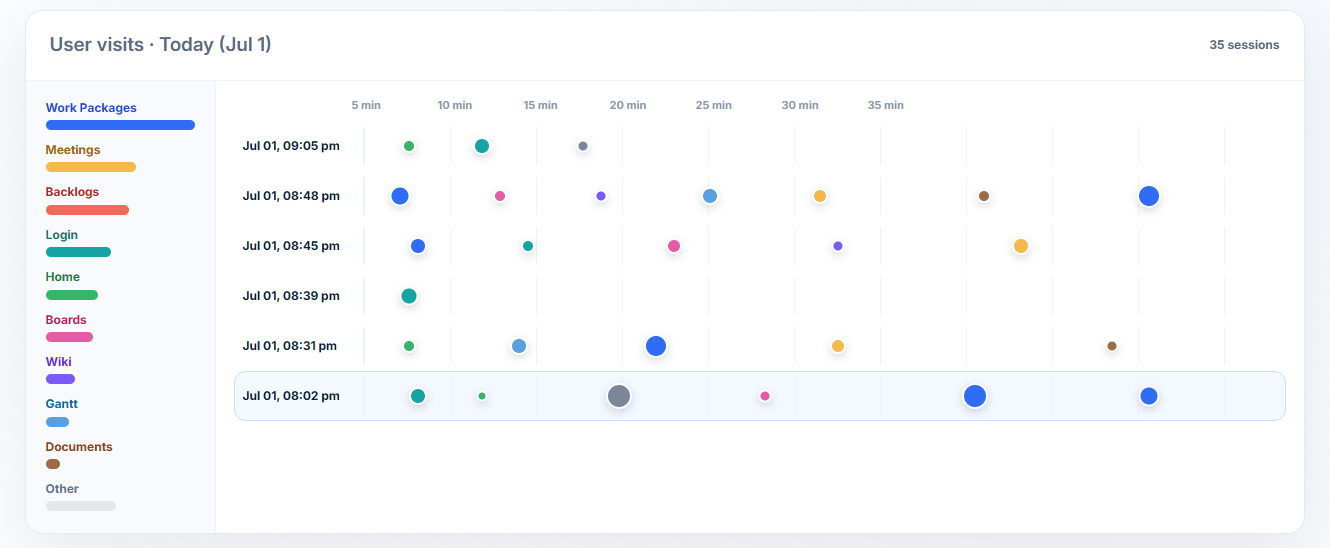
The ordered product pages and areas touched during one session.

Session visits & replay
Visits turns every product session into a readable timeline of product areas, page changes, replay evidence, and account context.
Find the session, inspect the replay, and connect it to the account-level signal that needs attention.
Explore a sample SaaS project. No credit card required.
Visit model
A visit is not just a recording. It is a session-level evidence layer that keeps product movement, event detail, timing, and user or company context together.
The ordered product pages and areas touched during one session.
Clicks, hovers, page changes, repeated actions, and marked moments.
Duration, engaged time, pauses, dense clusters, and drop-off points.
The project, product area, page, and recommendation connected to the visit.
Open a session
When a session needs inspection, Hymetry opens a focused replay view with a sample product screen, centered recording player, and a custom timeline of page bubbles.
The current demo detail keeps the replay focused on the recording and the page sequence instead of surrounding it with repeated cards.
Product movement
The path view focuses on movement: which product areas appeared, where markers cluster, and where the session shifts from entry pages into deeper product work.
Event evidence
Event-level detail helps teams identify the exact parts of the replay that deserve attention: entry, page changes, dense page clusters, workflow shifts, and the final active area.
Connected evidence
Visits are not isolated videos. The session connects back to the project, affected product areas, page evidence, and recommendations that need replay context.
Work Packages dominates the page-area legend and the selected recording, so it is the first place to inspect when the visit needs context.
Replay controls
Session evidence should be useful and controlled. Hymetry can apply privacy controls, filter sensitive fields, ignore configured pages or elements, and keep safe metadata attached to the visit.
Teams decide what not to capture before relying on replay context for investigation.
Recommendations
Once the important moment is clear, Hymetry can point the team to the evidence source and the next place to inspect.
Evidence from the selected demo visit shows a short entry path, a Projects cluster, a Boards shift, and then a dense Work Packages sequence. Compare similar sessions before changing the workflow.
| Signal | Evidence | Source | Next action |
|---|---|---|---|
| Entry path | Login to Home | Session timeline | Confirm session start |
| Page cluster | Projects markers 3-8 | Path timeline | Review browsing context |
| Workflow shift | Projects to Boards | Replay marker | Inspect transition |
| Dense work | Work Packages markers 10-21 | Replay timeline | Compare similar sessions |
Explore a demo project first, then create your workspace when you’re ready.
No credit card required.